Have you ever opened a website and felt like:
“Why is this site loading so slowly?”
And then another website opens almost instantly, even though both look similar?
That speed difference often comes down to one important thing:
CDN
A few years ago, when I first heard the word CDN, I honestly thought it was some advanced enterprise-level thing only big companies like Netflix or Amazon used.
But later, while optimizing one of my own projects, I realized:
CDN is one of the easiest ways to make a website feel dramatically faster.
And the funny part?
Most beginners install themes, plugins, animations, fancy UI… but completely ignore how content is actually delivered to users worldwide.
In this article, I’ll explain how CDN improves website speed deeply but simply, like a real developer sharing practical experience — not a networking professor reading definitions.
By the end, you’ll understand:
- What CDN actually is
- Why websites become slow
- How CDN works behind the scenes
- How CDN caches files
- Why global websites need CDNs
- CDN vs hosting
- Real examples
- Common mistakes
- My experience improving site speed using CDN
- Whether small websites should use CDN or not
Let’s start from zero.
What Is a CDN?
CDN stands for:
Content Delivery Network
Sounds complicated.
But the idea is actually very simple.
A CDN is:
a network of servers located in different countries and cities that deliver website content from the nearest location to the visitor.
That’s the core concept.
Instead of loading your website from one faraway server every time…
CDN serves content from a nearby server.
Result?
- faster loading
- lower latency
- smoother experience
The Problem Without CDN
Let’s understand this practically.
Suppose:
- your hosting server is in Germany
- but your visitor is in India
Without CDN:
- every image
- CSS file
- JavaScript file
- request
travels all the way from India → Germany → India.
That takes time.
Especially on:
- slower internet
- mobile networks
- global traffic
Now imagine thousands of visitors doing this continuously.
Website becomes slower.
The Simplest Real-Life Example
This analogy made CDN click in my brain instantly.
Imagine:
You own one pizza shop in Delhi.
Now someone from Mumbai orders pizza.
Delivery will obviously take longer.
But if you have small branches in:
- Mumbai
- Bangalore
- Kolkata
then customers get faster delivery.
That’s exactly how CDN works.
Your original hosting server is the main kitchen.
CDN servers are local delivery branches worldwide.
Why Website Speed Actually Matters
Some beginners think:
“2–3 seconds slow is okay.”
Not really.
Slow websites hurt:
- SEO
- user experience
- conversions
- engagement
- AdSense earnings
People leave fast.
Especially mobile users.
Honestly, even I close websites sometimes if they feel slow.
Users today expect instant loading.
What CDN Actually Stores
Important point:
CDN usually stores:
- images
- CSS
- JavaScript
- videos
- fonts
- static files
This process is called:
Caching
Instead of requesting files from original server every time…
CDN stores copies temporarily.
So nearby users receive cached content instantly.
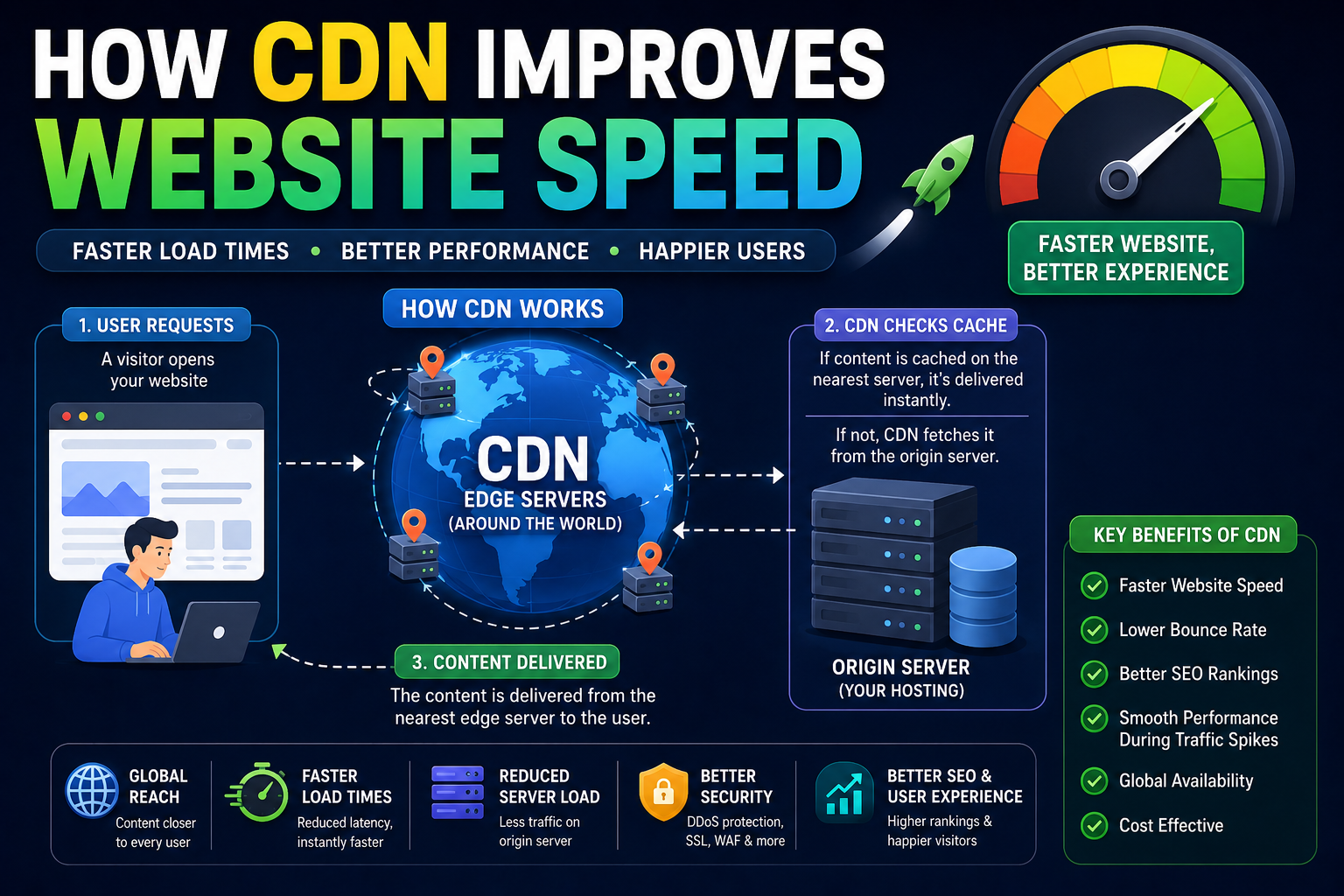
How CDN Works Step by Step
Let’s go deep now.
Suppose someone opens:ashbyte.in
Here’s what happens.
Step 1: User Opens Website
Visitor requests your website.
Step 2: CDN Checks Nearby Edge Server
CDN looks for nearest server location.
Example:
- Delhi
- Mumbai
- Singapore
whichever is closest.
These are called:
Edge Servers
Step 3: Cached Content Is Delivered
If files already exist in CDN cache:
- CDN sends them instantly
No need to contact origin server again.
This is called:
Cache Hit
Very fast.
Step 4: Missing Files Are Requested
If file isn’t cached:
- CDN requests it from original hosting server
stores copy temporarily
then delivers it to visitor.
This is:
Cache Miss
Step 5: Future Visitors Get Faster Speed
Now content exists in edge server.
Next visitors nearby load website much faster.
That’s the magic.
My Experience Using CDN for the First Time
I still remember the first time I enabled a CDN on one of my websites.
Honestly?
I didn’t expect much difference.
I thought:
“Bas thoda optimization hoga.”
But after setup:
- image loading became noticeably faster
- mobile experience improved
- page speed scores improved
- server load reduced
Especially for visitors far from hosting location.
That’s when I realized:
CDN isn’t just for giant companies anymore.
Even blogs benefit from it.
CDN vs Hosting (Important Difference)
Many beginners confuse these.
Let’s simplify.
Hosting
Stores:
- website files
- database
- backend
Main source of your website.
CDN
Delivers cached copies faster globally.
CDN does NOT replace hosting.
It improves content delivery.
Think of it like:
Hosting = Main warehouse
CDN = Local delivery centers
Why Websites Become Slow Without CDN
There are several reasons.
1. Long Distance Data Travel
Farther server = more latency.
2. Heavy Images
Large images slow everything.
3. Too Many Requests
Every CSS, JS, image request takes time.
4. Server Overload
Single server handling global traffic becomes stressed.
5. No Caching
Files regenerated repeatedly.
Very inefficient.
How CDN Reduces Server Load
This is underrated.
Without CDN:
- all visitors hit origin server directly
With CDN:
- CDN handles many requests itself
Meaning:
- less bandwidth usage
- lower server stress
- better scalability
Very important during traffic spikes.
What Is Latency?
Latency means:
delay between request and response.
Closer server = lower latency.
Lower latency = faster feeling website.
This matters massively for:
- gaming
- streaming
- real-time apps
and websites too.
Edge Servers Explained Simply
Edge servers are CDN servers placed globally.
Example:
- India
- Singapore
- London
- USA
- Dubai
User gets content from nearest edge server instead of distant origin server.
That’s why CDN improves global speed.
Cache Hit vs Cache Miss
Very important CDN concept.
Cache Hit
Requested file already exists in CDN cache.
Fastest scenario.
Cache Miss
CDN must fetch file from origin server first.
Slightly slower initially.
After caching:
future requests become faster.
Popular CDN Providers
Some popular CDN services:
- Cloudflare
- Akamai
- Fastly
- Amazon CloudFront
Cloudflare is especially popular for beginners because setup is relatively easy.
CDN Also Improves Security
Many people don’t know this.
Modern CDNs also provide:
- DDoS protection
- firewall features
- bot filtering
- SSL support
Meaning CDN helps with:
- speed
- security
Both.
How CDN Helps SEO
Google cares about:
- page speed
- user experience
Faster websites:
- reduce bounce rate
- improve engagement
- improve Core Web Vitals
CDN indirectly helps SEO performance.
Not magic ranking boost…
but definitely beneficial.
CDN and Mobile Users
This matters a LOT now.
Most users browse on:
- slower mobile networks
- inconsistent internet
CDN helps mobile visitors significantly because:
- smaller latency
- faster cached delivery
Especially important in countries with mixed network quality.
What Happens During Traffic Spikes?
Suppose your blog suddenly goes viral.
Without CDN:
- server may crash
With CDN:
- cached content distributed globally
This reduces pressure on origin server.
Very useful during:
- product launches
- viral posts
- news spikes
Mistakes I Made While Using CDN
I definitely made some dumb mistakes initially.
1. Caching Everything Blindly
Dynamic pages should not always be cached aggressively.
Otherwise:
- outdated content appears
2. Forgetting Cache Purge
Updated images didn’t appear because old cache remained active.
Classic beginner problem.
3. Thinking CDN Fixes Bad Hosting
CDN improves delivery.
But terrible hosting still causes issues.
CDN is not magic.
4. Ignoring Image Optimization
CDN helps…
but huge 10MB images still hurt performance badly.
Optimization still matters.
What I Learned About Website Speed
One important lesson:
Website speed is not about one thing.
It’s a combination of:
- hosting
- caching
- CDN
- images
- code quality
- server response
- database optimization
CDN is one powerful piece of the puzzle.
Not the entire puzzle.
Should Small Websites Use CDN?
Honestly?
Yes.
Even blogs benefit today.
Especially because:
- many CDN services offer free plans
- setup is easier than before
If your audience comes from multiple regions, CDN is extremely useful.
CDN for Blogs vs Startups
Blogs
CDN improves:
- image loading
- mobile speed
- SEO performance
Startups
CDN helps with:
- scalability
- global delivery
- API acceleration
- security
Different priorities, same core benefits.
Real-World Example
Imagine:
Your hosting server is in the USA.
Visitor from India opens your site.
Without CDN:
- files travel USA → India
With CDN:
- files delivered from Indian edge server
Massive difference in speed.
Especially for heavy websites.
Why Big Companies Depend on CDN
Companies like:
- Netflix
- YouTube
- Amazon
serve users globally.
Without CDN:
- buffering
- lag
- terrible experience
would become unavoidable.
CDNs are essential for modern internet infrastructure.
CDN and Streaming Platforms
Streaming services rely heavily on CDN.
Because videos are huge.
Instead of one central server handling millions of users:
- CDN distributes video delivery globally
That’s why streaming works smoothly.
Real Advice for Beginners
If you’re starting a website today:
At minimum:
- use caching
- optimize images
- enable CDN
These three things alone can dramatically improve speed.
And honestly…
speed optimization becomes addictive once you start seeing improvements.
Beginner-Friendly CDN Setup Advice
If you’re new:
- start with Cloudflare
- don’t overconfigure everything
- learn gradually
Understand:
- DNS
- cache
- SSL
- page rules
step by step.
No need to become infrastructure engineer overnight.
The Future of CDN
Modern CDNs are evolving beyond static delivery.
Now they offer:
- edge computing
- serverless functions
- image optimization
- AI traffic routing
CDNs are becoming smarter every year.
My Thoughts
When I first learned about CDNs, I thought:
“Okay… it just makes websites faster.”
But later I realized CDNs are much bigger than that.
They improve:
- speed
- scalability
- reliability
- global performance
- security
And once you understand how internet distance affects loading times, CDN suddenly makes perfect sense.
At the core, CDN simply does this:
deliver content from the nearest possible server to the user.
That simple idea powers a huge part of the modern internet.
