If you’re planning to create a website, blog, startup landing page, portfolio, or even an online store, then you’ve definitely heard these two words everywhere:
Domain and Hosting
And honestly… most beginners get confused here.
I still remember when I bought my first domain. I thought:
“Bas domain le liya… website automatically live ho jayegi.”
Spoiler: it didn’t.
Then I bought hosting from another company, changed random DNS settings without understanding anything, and my site disappeared for almost 2 days. I literally thought I had broken the internet.
So in this article, I’ll explain how domain & hosting actually work together, in the simplest possible way — not textbook style, but like one developer explaining another beginner.
By the end of this guide, you’ll understand:
- What a domain really is
- What hosting actually does
- How both connect together
- What happens when someone opens your website
- DNS explained simply
- Real examples
- Common mistakes beginners make
- My personal experience and advice
Let’s start from zero.
What Is a Domain Name?
A domain name is simply the address of your website.
Example:
google.comyoutube.comashbyte.in
Instead of remembering complicated server IP addresses like:
192.168.1.1
we use human-friendly names.
Think of a domain like:
Your house address on the internet.
If someone wants to visit your website, they type your domain name into the browser.
Simple.
What Is Web Hosting?
Now here comes the important part.
A domain alone cannot show a website.
You need a place where your website files are stored.
That place is called web hosting.
Hosting stores things like:
- HTML files
- Images
- CSS
- JavaScript
- Databases
- Videos
- Backend code
Basically, your entire website lives inside a hosting server.
Think of hosting like:
A rented computer that stays ON 24/7 and serves your website to visitors.
The Simplest Real-Life Example
Let’s understand this with a real-world analogy because this is where most people finally “get it.”
Domain = Home Address
Example:
Ashbyte.in
This is the address people use to find you.
Hosting = Actual House
This is where your furniture, TV, laptop, and everything exists.
Without the house, the address is useless.
Without the address, nobody can find the house.
That’s exactly how domain and hosting work together.
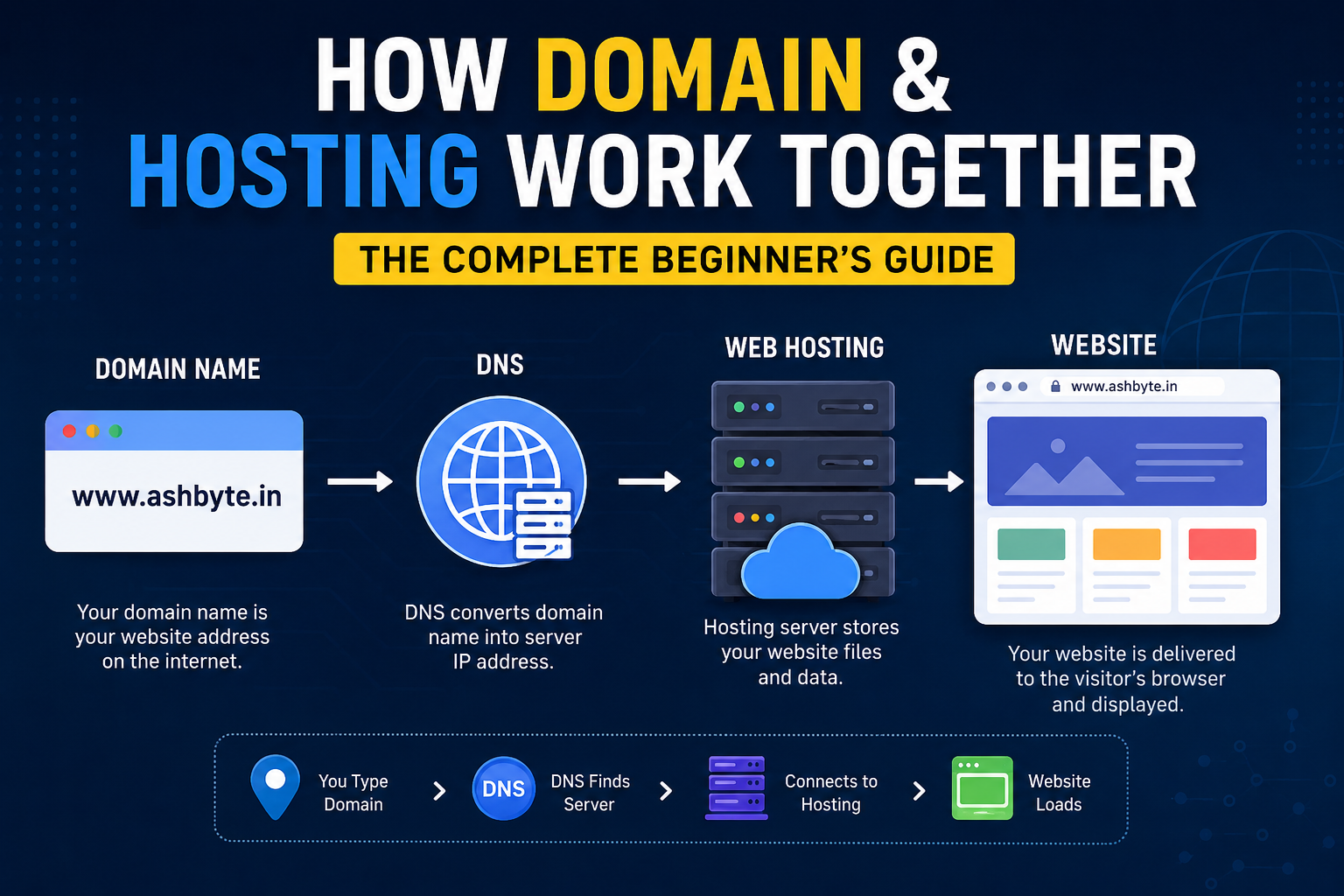
How Domain & Hosting Work Together
Now let’s go deeper.
This is the actual flow when someone visits your website.
Step 1: User Types Your Domain
Example:
www.ashbyte.in
Browser now asks:
“Where is this website located?”
Step 2: DNS Finds the Hosting Server
DNS stands for:
Domain Name System
Its job is to convert domain names into server IP addresses.
Example:
ashbyte.in → 145.223.xx.xx
Like a phonebook of the internet.
Step 3: Browser Connects to Hosting Server
Now the browser reaches your hosting server.
The server contains your website files.
Step 4: Website Loads
Hosting server sends:
- HTML
- CSS
- Images
- Scripts
- Data
to the visitor’s browser.
And boom — your website appears.
That entire process usually happens in seconds.
What Actually Happens Behind the Scenes?
Most articles stop at basics.
But let’s go deeper because understanding this changes everything.
When you connect a domain to hosting, several things work together:
1. Domain Registrar
This is where you buy your domain.
Examples:
- GoDaddy
- Namecheap
- Google Domains
They manage your domain ownership.
2. Hosting Provider
This is where your website lives.
Examples:
- Hostinger
- Bluehost
- DigitalOcean
- AWS
They provide servers.
3. Nameservers
This is the bridge between domain and hosting.
When you buy hosting, hosting companies give nameservers like:
ns1.hostinger.comns2.hostinger.com
You add these in your domain settings.
Now your domain knows:
“Okay, this hosting server contains my website.”
My Experience: The First Time I Connected Domain & Hosting
I’ll be honest.
The first time I tried connecting a domain to hosting, I was completely lost.
I had:
- One domain from GoDaddy
- Hosting from Hostinger
- Zero idea what DNS meant
I changed:
- A records
- CNAME
- Nameservers
randomly after watching half YouTube tutorials.
And suddenly:
- Website stopped opening
- SSL broke
- Emails stopped working
I spent an entire night refreshing the browser every 10 minutes.
Later I learned the biggest lesson:
DNS changes take time to propagate.
Sometimes:
- 5 minutes
- Sometimes hours
- Sometimes 24–48 hours
That’s normal.
Beginners panic too early.
I definitely did.
What Is DNS?
This is the most important concept.
And surprisingly, most people memorize DNS instead of understanding it.
Here’s the simplest explanation.
Imagine:
You save your friend’s number as:
“Rahul”
You don’t remember the actual number.
Your phone translates:
- Rahul → Actual Number
DNS does the same thing.
It converts:
- Domain name
into - Server IP address
Without DNS, the internet would be chaos.
Important DNS Records You Should Know
You don’t need to become a networking engineer.
But these are useful.
A Record
Points domain to server IP.
Example:
ashbyte.in → 145.223.xx.xx
Most important record.
CNAME Record
Used for aliases.
Example:
www.ashbyte.in → ashbyte.in
MX Record
Used for email services.
If you use:
- Gmail Workspace
- Zoho Mail
these matter.
TXT Record
Used for verification/security.
For example:
- Google verification
- SPF
- DKIM
Shared Hosting vs VPS vs Cloud Hosting
This is where beginners waste money.
Let’s simplify it.
Shared Hosting
Cheapest option.
Your website shares one server with many websites.
Good for:
- Beginners
- Blogs
- Small business sites
Bad for:
- Huge traffic
- Heavy applications
VPS Hosting
Virtual Private Server.
You get dedicated resources.
Better performance and control.
Good for:
- Growing websites
- Startups
- Custom backend projects
Cloud Hosting
Modern scalable hosting.
Resources can scale dynamically.
Used by:
- Big startups
- SaaS products
- Enterprise apps
Examples:
- AWS
- Google Cloud
- Azure
Which Hosting Should Beginners Choose?
Honestly?
Most beginners overthink this.
If you’re:
- Starting a blog
- Portfolio
- Small startup site
- WordPress site
then simple shared hosting is enough.
Don’t buy expensive cloud servers on Day 1 just because some YouTuber said so.
I’ve seen people spend thousands monthly for websites getting 20 visitors/day.
Makes no sense.
How SSL Fits Into This
You’ve seen websites with:
https://
That lock icon is SSL.
SSL encrypts communication between:
- User browser
- Server
Without SSL:
- Browsers show warnings
- SEO suffers
- Trust decreases
Most hosting providers now offer free SSL.
Usually through:
- Let’s Encrypt
What Happens If Hosting Goes Down?
Interesting question.
If:
- Domain is active
- But hosting server is down
Then:
- Website won’t open
Because the “house” is unavailable.
Similarly:
If hosting exists but domain expires:
- Website files still exist
- But nobody can access easily
Both are important.
Can Domain and Hosting Be From Different Companies?
Absolutely.
Very common setup.
Example:
- Domain from Namecheap
- Hosting from Hostinger
You simply connect them via DNS settings.
Honestly, I prefer separating them.
Why?
Because if hosting company creates issues, migrating becomes easier.
Common Beginner Mistakes
I made almost all of these myself.
1. Buying Expensive Hosting Too Early
You don’t need enterprise hosting for a new blog.
Start simple.
2. Ignoring Backups
Huge mistake.
Always keep backups.
One plugin update can destroy your site.
Yes, it happens.
3. Not Understanding Renewal Prices
Some hosting plans show:
- ₹99/month
But renewal becomes:
- ₹499/month
Always check renewal pricing.
4. Messing With DNS Randomly
Never change records blindly.
One wrong DNS entry can:
- Break website
- Break email
- Break SSL
Been there.
5. Buying Domain From Unknown Providers
Cheap isn’t always good.
Stick with trusted registrars.
What I Learned After Building Multiple Websites
After building blogs, startup landing pages, test projects, and random failed experiments, I realized something:
Domain and hosting are less about technology and more about understanding the internet structure.
Once this clicks, website management becomes easy.
Earlier:
- DNS felt scary
- Hosting dashboards looked confusing
Now it feels normal because I understand the flow.
That’s the key.
Don’t memorize settings.
Understand the connection.
Real Advice for Beginners
If you’re starting today, here’s exactly what I’d suggest.
For Blogs
- Buy a clean domain
- Start with shared hosting
- Use WordPress
- Focus on content first
For Startup Websites
Use:
- VPS or cloud hosting
- CDN
- Proper backups
Because performance matters more.
For Developers
Learn:
- DNS
- Linux basics
- Server deployment
These skills become insanely valuable later.
A Simple Visualization
Here’s the entire flow again:
User opens:ashbyte.in
↓
DNS finds server IP
↓
Browser connects to hosting server
↓
Hosting sends website files
↓
Website loads
That’s literally the internet magic behind every website you open daily.
Crazy simple once understood.
Why Understanding This Actually Matters
A lot of people skip fundamentals.
Big mistake.
Because later when:
- Website breaks
- Domain expires
- SSL fails
- Emails stop working
- DNS errors happen
you panic if you don’t understand basics.
But if you know how domain and hosting work together, troubleshooting becomes much easier.
And honestly, this knowledge gives confidence.
My Thoughts
When I first entered web development, domain and hosting felt super technical.
Like something only “server experts” understood.
But once I broke it down practically, everything became easier.
At the end of the day:
- Domain = Address
- Hosting = Storage/server
- DNS = Connector
That’s it.
The internet looks complicated from outside, but its core ideas are surprisingly simple.
And trust me:
once you understand this properly, managing websites becomes 10x less confusing.
