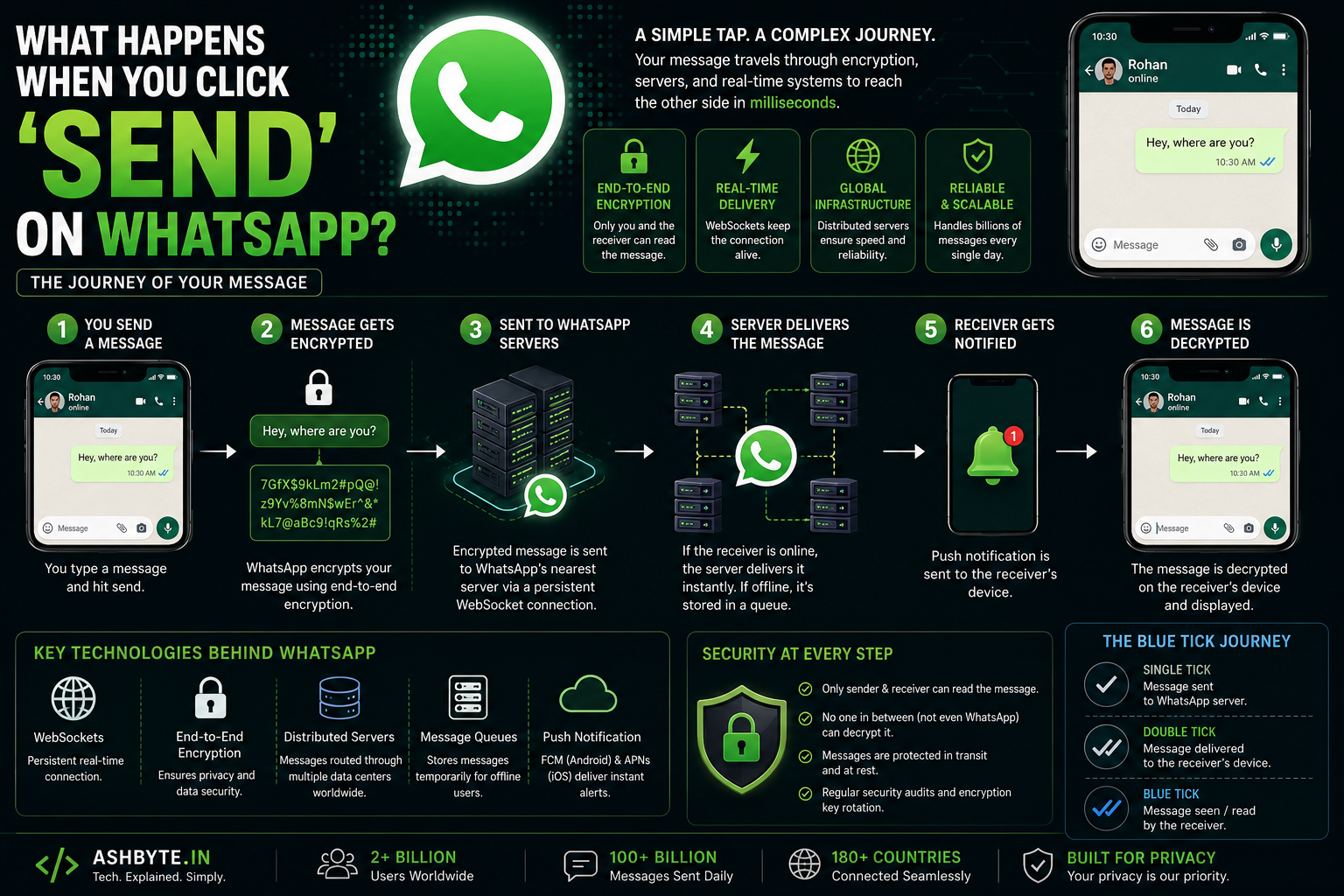
Let’s be honest…
We send messages on WhatsApp so casually that we never stop to think about what’s actually happening.
You type:
Hey, where are you?Tap send…
…and within milliseconds, the message reaches another person.
Maybe they’re:
- In another city
- Another country
- Using different internet speed
- On Android while you’re on iPhone
And somehow…
It still works instantly.
Now if you think deeply about it…
That’s actually insane.
Because behind that tiny green “send” button, there’s an entire real-time infrastructure working continuously:
- Encryption
- Internet routing
- WebSockets
- Distributed servers
- Message queues
- Databases
- Push notifications
And honestly?
The first time I tried building a real-time chat feature…
I realized how difficult messaging systems actually are
So in this blog, I’ll explain what happens when you click “Send” on WhatsApp — deeply, but in very simple language.
No boring textbook explanation.
Just real understanding.
Why This Topic Is More Interesting Than It Looks
At first glance, messaging seems simple.
Just:
- Send text
- Receive text
Done.
But real-time messaging apps are some of the most complex systems on the internet.
Because they need:
- Instant delivery
- Reliability
- Security
- Scalability
All together.
And at billions-of-users scale.
My Experience
When I first tried making a chat system…
I used simple REST APIs.
Something like:
POST /send-message
GET /messages
And technically…
It worked.
But experience was terrible.
Problems:
- Messages delayed
- Manual refresh needed
- Duplicate messages
- No real-time feel
Then I discovered:
WebSockets
And suddenly everything changed.
That’s when I realized:
Messaging apps are not “normal apps.” They’re real-time distributed systems.
Step-by-Step: What Actually Happens When You Click “Send”
Now let’s break the entire journey.
Step 1: You Type the Message
Example:
Hello!At this point:
- Message exists only on your device
- Inside WhatsApp app memory
Step 2: WhatsApp Creates Message Metadata
Before sending, app adds extra information:
Like:
- Sender ID
- Receiver ID
- Timestamp
- Message ID
- Device info
This metadata helps track and deliver message properly.
Example Structure (Simplified)
{
  "message": "Hello!",
  "sender": "Ashish",
  "receiver": "Rohan",
  "timestamp": "10:45 AM"
}
Step 3: Message Gets Encrypted
This is VERY important.
WhatsApp uses:
End-to-End Encryption
Meaning:
Message encrypted BEFORE leaving your phone.
What Encryption Means
Message converts into unreadable format.
Example:
Hello → X7#K9@P!Only receiver can decrypt it.
Why This Matters
Even:
- WhatsApp servers
- Hackers
- Internet providers
cannot read actual message.
That’s huge.
Step 4: WhatsApp Opens Real-Time Connection
WhatsApp doesn’t keep sending normal HTTP requests repeatedly.
Instead…
It uses:
WebSockets
What is WebSocket?
Persistent connection between:
- Your phone
- WhatsApp servers
Think of it like:
An always-open tunnel
Instead of:
Connect → send → disconnectIt stays connected continuously.
Why This Is Powerful
Because:
- Faster messaging
- Real-time delivery
- Low latency
Step 5: Message Travels Through Internet
Now your encrypted message travels through:
- WiFi/mobile network
- ISPs
- Routers
- Internet infrastructure
Until it reaches WhatsApp servers.
This Happens In Milliseconds
Which is honestly mind-blowing.
Step 6: WhatsApp Server Receives Message
Now WhatsApp server checks:
- Is receiver online?
- Which device is active?
- Is connection available?
Important Thing:
Server still cannot read actual message content because it’s encrypted.
Step 7A: If Receiver is Online
Best case.
Server immediately forwards encrypted message.
Step 7B: If Receiver is Offline
This is where queue systems matter.
Message Queue System
WhatsApp temporarily stores encrypted message.
Until:
Receiver comes online
Then message delivered.
This Is Why Messages Don’t Usually Get Lost
Queue systems are critical in messaging architecture.
Step 8: Push Notification Sent
If app closed:
- Notification service triggered
Example:
- Android → Firebase Cloud Messaging
- iPhone → Apple Push Notification Service
That’s Why You Instantly See:
NeW message from RohanStep 9: Receiver Device Gets Message
Receiver’s WhatsApp app receives encrypted data.
Step 10: Message Decrypted
Using secret encryption keys.
Now finally:
Hello!becomes readable again.
Important Point
Only receiver device can decrypt.
Not server.
Not network.
Only receiver.
Step 11: Blue Tick System (Interesting Part)
This seems simple…
But internally, it’s another messaging system.
Single Tick
Message reached server.
Double Tick
Message delivered to receiver device.
Blue Tick
Receiver opened chat/read message.
These Are Separate Events
Each tick involves backend updates.
How WhatsApp Handles Billions of Messages
This part is insane.
Because WhatsApp handles:
100+ billion messages daily
That scale is crazy.
So How Does It Handle This?
1. Distributed Servers
Instead of one giant server:
- Thousands of servers worldwide
Why?
Because:
- One server would crash instantly
- Latency reduced globally
2. Load Balancers
Traffic distributed intelligently.
Example:
- Indian users → nearby servers
- US users → different servers
3. Horizontal Scaling
Instead of:
Bigger server
They use:
More servers
4. Efficient Data Protocols
WhatsApp optimized for low internet.
That’s why messages work even on slow networks.
How Media Files Work (Photos/Videos)
Media handling is different.
Because sending huge video directly through chat server is inefficient.
What Happens Instead
Step 1:
Media uploaded separately to storage servers.
Step 2:
Encrypted link generated.
Step 3:
Receiver downloads media using link.
Similar to Cloud Storage Systems
This improves performance massively.
Security Behind WhatsApp
This is one reason WhatsApp became huge.
Major Security Features
End-to-End Encryption
Most important.
Secure Key Exchange
Encryption keys safely shared.
Authentication
Prevent fake sessions.
Device Verification
Linked devices securely verified.
Real Problems Messaging Systems Face
This is where real engineering starts.
1. Network Failure
Internet disconnect mid-message.
2. Duplicate Messages
User taps send multiple times.
3. Message Ordering
Messages arriving in wrong order.
4. Offline Synchronization
Messages syncing after reconnect.
5. Scalability
Millions online simultaneously.
Real-time systems are HARD.
Mistakes I Made (You’ll Probably Relate)
1. Using Only REST APIs
No real-time feel.
2. Ignoring Offline Users
Messages lost.
3. No Queue System
Huge reliability issues.
4. No Proper Message IDs
Duplicate message chaos
5. Ignoring Scalability
Worked for 5 users.
Failed for 50.
What I Learned
After exploring messaging systems deeply, these became my rules:
- Real-time apps need different architecture
- WebSockets are essential
- Queues are critical
- Reliability matters more than features
- Simplicity in UX hides huge backend complexity
And biggest lesson:
Systems like WhatsApp look simple because incredible engineering is hidden underneath.
Real Advice (If You Want to Build Chat Systems)
If you’re building:
- Chat apps
- Notifications
- Real-time dashboards
Learn these deeply:
Important Technologies
- WebSockets
- Redis
- Message queues
- Distributed systems
- Cloud storage
Start Small
Don’t try building “WhatsApp clone” immediately
Start with:
- One-to-one chat
- Real-time updates
- Message persistence
Then scale gradually.
Real-Life Scenario (Relatable)
Imagine building:
Student chat support inside Uniqoor
Without Proper Architecture:
- Delayed messages
- Missed notifications
- Poor experience
With Proper Real-Time Design:
- Instant communication
- Reliable delivery
- Smooth UX
Huge difference.
Future of Messaging Apps
Messaging systems are evolving rapidly.
Trends:
- AI-assisted chats
- Decentralized messaging
- Better encryption
- Multi-device sync improvements
- Real-time translation
Messaging Will Become Smarter
But backend complexity will also increase massively.
Final Thoughts
That tiny “Send” button on WhatsApp…
Triggers one of the most sophisticated systems on the internet.
Behind a simple message, there’s:
- Encryption
- Networking
- Real-time infrastructure
- Distributed systems
- Queue architecture
- Global server coordination
And honestly…
Once you understand systems like this deeply, you stop looking at apps the same way.
You start seeing:
Engineering behind the experience.
