Let me start with something crazy…
Every single day, billions of files are uploaded to the cloud:
- Photos
- Videos
- PDFs
- Backups
- App data
- Chat media
And most of us never think twice about it.
You upload a file to Google Drive…
…and somehow it’s available instantly on:
- Your laptop
- Phone
- Tablet
Even after months.
Even if your device breaks.
Now think about that for a second.
How does a file uploaded from your room suddenly become accessible worldwide?
That question fascinated me when I first started backend development.
Initially I thought:
“Cloud storage matlab bas online folder.”
Simple.
But once I started working with AWS S3 and file uploads in real projects…
Bro… it goes MUCH deeper.
There’s:
- Distributed storage
- Data replication
- Object storage
- CDN systems
- Encryption
- Metadata indexing
- Redundancy
And honestly?
Cloud storage is one of the most important systems powering the modern internet.
So in this blog, I’ll explain how cloud storage works behind the scenes — deeply, but in simple human language.
No boring corporate explanation.
What is Cloud Storage?
Cloud storage means:
Storing files on remote servers instead of your local device.
Instead of saving on:
- Your laptop
- Your hard drive
Files are stored in:
Massive data centers across the world.
Real-Life Analogy
Think of cloud storage like this:
Instead of keeping all your documents at home…
You store them in a super-secure digital warehouse.
And whenever needed:
- You request file
- Warehouse sends it instantly
That warehouse = cloud infrastructure.
Why Cloud Storage Became So Important
Before cloud storage:
- Files stored locally
- Hard disk crash = data gone
- Sharing difficult
- Backup difficult
Cloud solved all this.
Now:
- Access from anywhere
- Automatic backup
- Easy collaboration
- Massive scalability
My Experience (Reality Check)
First time I implemented file uploads in a project…
I stored images directly in server folder.
Worked perfectly.
Until traffic increased.
Then problems started:
- Server storage filling up
- Slow loading
- Deployment issues
- File loss risk
That’s when I shifted to:
AWS S3
And suddenly everything became:
- Faster
- Cleaner
- Scalable
That was my first real understanding of cloud storage systems.
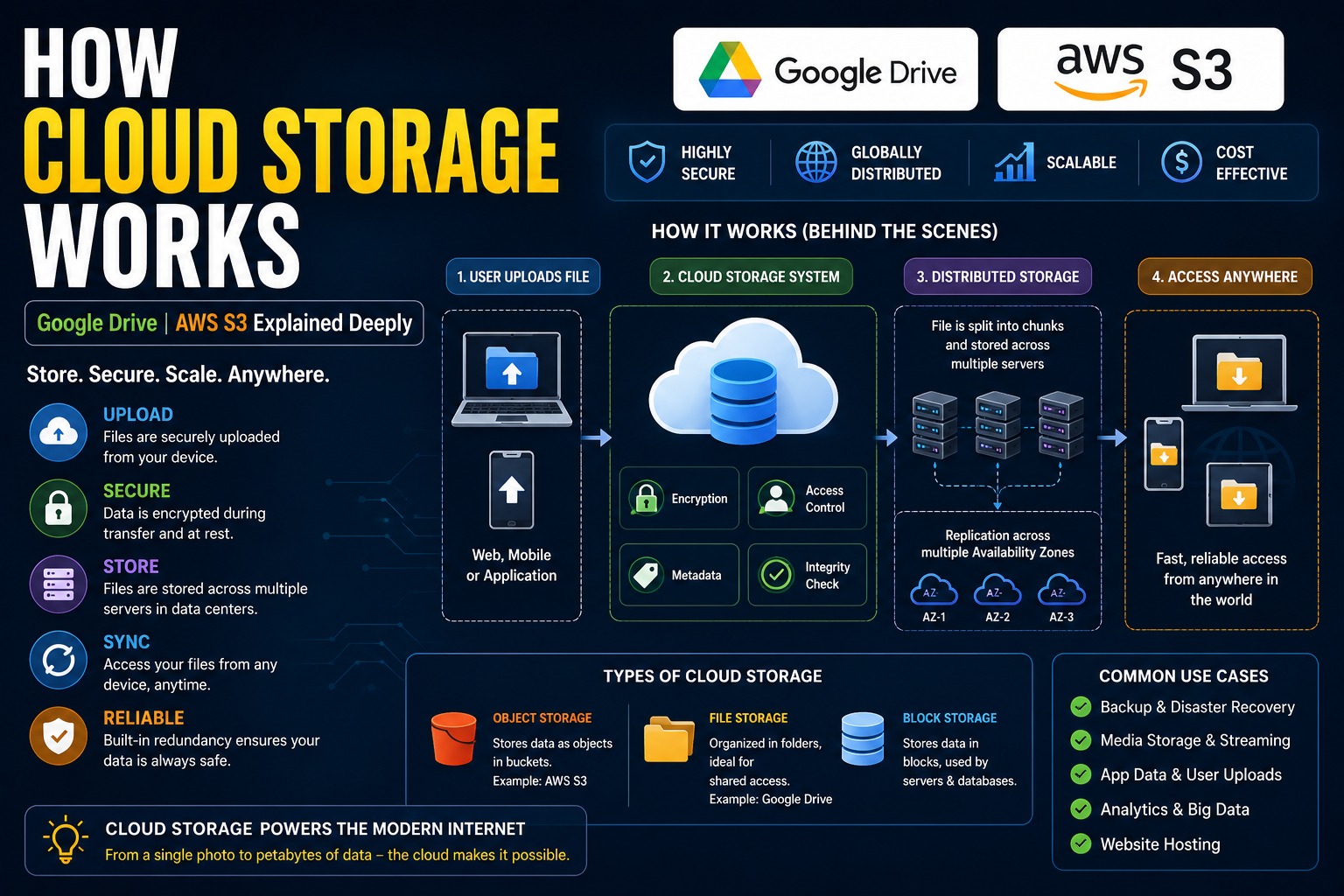
How Cloud Storage Actually Works (Step-by-Step)
Now let’s go deep.
Step 1: User Uploads File
Example:
You upload:
photo.jpgStep 2: File Sent to Cloud Server
Your app sends file through:
- APIs
- HTTPS requests
Step 3: File Processed
Cloud system checks:
- File size
- File type
- Security validation
Step 4: File Broken into Chunks
This is important.
Large files often split into smaller pieces.
Why?
- Faster uploads
- Better reliability
- Easy recovery
Step 5: Data Stored Across Multiple Servers
This is where cloud magic starts.
Your file is NOT usually stored in one single machine.
Instead:
Multiple copies stored across different systems.
This is called:
Data Replication
Why Replication Matters
If one server fails:
Another copy still exists.
That’s why services like Google Drive rarely lose data.
Step 6: Metadata Stored
Cloud system stores:
- File name
- Owner
- Size
- Permissions
- Location references
This metadata helps retrieve files quickly.
Step 7: File Retrieval
When user opens file:
- System identifies location
- Retrieves nearest copy
- Sends back efficiently
What Happens Inside Google Drive?
Let’s talk practical.
Google Drive seems simple:
- Upload file
- Open anywhere
But internally?
Insanely advanced.
Google Drive Internally Uses:
Distributed Storage
Files spread across multiple systems.
Replication
Multiple copies stored.
Compression
Reduce storage usage.
Deduplication
If same file uploaded repeatedly:
System may avoid storing duplicate copies.
Sync Engine
Keeps devices updated in real-time.
Example:
You edit document on laptop.
Phone instantly updates.
That synchronization system is extremely complex internally.
Amazon Web Services S3 is one of the most popular cloud storage services.
S3 = Simple Storage Service
And honestly…
Almost every developer eventually touches it
Why Developers Love AWS S3
Because it’s:
- Scalable
- Reliable
- Cheap
- Fast
How S3 Stores Data
S3 uses:
Object Storage
What is Object Storage?
Instead of folders like traditional systems:
S3 stores:
- File
- Metadata
- Unique ID
Together as:
Object
Example:
bucket-name/profile-image-123.jpgImportant Terms in AWS S3
1. Bucket
Container for files.
2. Object
Actual stored file.
3. Key
Unique file path.
4. Region
Physical data center location.
Why Cloud Storage is So Fast
This part amazed me initially.
How can huge files load so quickly?
Reasons:
CDN (Content Delivery Network)
Files cached globally.
Nearest Server Delivery
System sends file from closest location.
Parallel Processing
Multiple systems work together.
Optimized Infrastructure
Enterprise-grade hardware.
Security in Cloud Storage
This is a HUGE topic.
Because cloud systems store sensitive data.
Important Security Layers
Encryption
Files encrypted:
- During transfer
- During storage
Access Control
Permissions matter.
Example:
- Public file
- Private file
Signed URLs
Temporary secure links.
Authentication
Verify user identity.
Real Problems Cloud Storage Solves
1. Scalability
Need more storage?
Instantly available.
2. Reliability
Server crash?
Data still safe.
3. Accessibility
Access from anywhere.
4. Collaboration
Multiple users can work together.
5. Backup & Recovery
Huge advantage.
Mistakes I Made (You’ll Relate )
1. Storing Files on Main Server
Disaster at scale.
2. No Access Control
Private files accidentally public 😭
3. Ignoring File Optimization
Huge uploads = slow app
4. No CDN Usage
Slow media delivery.
5. No Cleanup Logic
Unused files eating storage.
What I Learned
After working with cloud systems, these became my rules:
- Separate app logic from storage
- Always use scalable storage
- Optimize uploads
- Secure everything
- Think globally
And biggest lesson:
Cloud storage is not just “saving files online.” It’s distributed system engineering.
Real Advice (If You’re Building a Startup)
If you’re building any serious product:
Use Cloud Storage Early
Don’t wait.
Recommended Options
For Beginners:
- Firebase Storage
- Cloudinary
For Scalable Systems:
- AWS S3
- Google Cloud Storage
Focus On:
- Security
- Scalability
- CDN integration
Real-Life Scenario
Let’s say you’re building:
An edtech platform like Uniqoor
Students upload:
- Documents
- Photos
- PDFs
Without Proper Cloud Storage:
- Slow uploads
- Data loss risk
- Server overload
With Cloud Storage:
- Fast uploads
- Secure files
- Better scalability
Huge difference.
Deep Dive: Distributed Storage Systems
This is where things become fascinating.
Big companies don’t rely on one storage machine.
They use:
- Clusters
- Distributed nodes
- Redundant systems
Why?
Because hardware fails.
Constantly.
So systems designed assuming:
“Something WILL fail.”
That mindset is what makes cloud infrastructure reliable.
Future of Cloud Storage
Things are evolving rapidly.
Trends:
- AI-powered storage optimization
- Edge storage
- Decentralized storage
- Faster object retrieval
- Serverless storage systems
Examples:
- IPFS
- Edge caching
- Smart archival systems
Final Thoughts
Cloud storage feels simple from outside.
Upload file. Open anywhere.
Done.
But internally…
It’s one of the most advanced systems in modern tech.
- Distributed architecture
- Replication
- Security
- Scalability
- Networking
Everything works together.
Once you understand cloud storage deeply…
You start understanding how modern internet infrastructure actually works.
