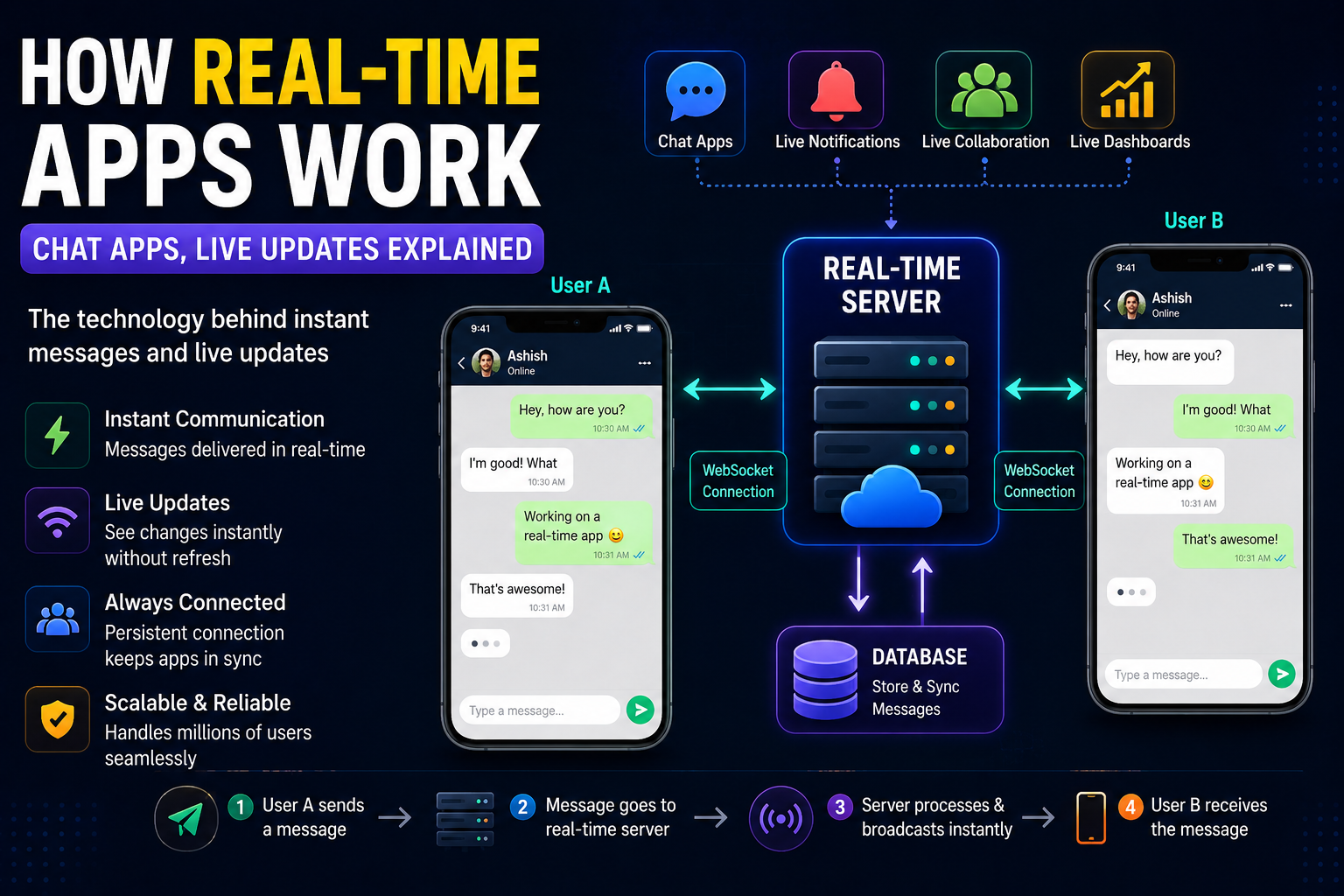
Have you ever thought about what actually happens when you send a message on WhatsApp… and the other person receives it almost instantly?
Or how:
- Instagram shows live notifications
- Google Docs updates while multiple people type together
- Food delivery apps track riders in real time
- Stock market apps refresh prices every second
Like seriously… how does all this happen so fast?
A few years ago, I had the same question while building a small chat feature for one of my projects. I thought:
“Message database me save hoga… then refresh karenge… then show ho jayega.”
Simple lag raha tha.
But the moment I tried building a real-time system myself, I realized:
- real-time apps are a completely different game.
There’s networking…
persistent connections…
event systems…
WebSockets…
message brokers…
latency…
scaling…
and suddenly your “simple chat app” becomes much more interesting.
In this article, I’ll explain how real-time apps work deeply but simply, like a real developer explaining another beginner — not some boring networking textbook.
By the end, you’ll understand:
- What real-time apps actually are
- How chat apps work
- WebSockets explained simply
- Polling vs WebSockets
- Live notifications
- Real-time databases
- How apps sync instantly
- Common beginner mistakes
- My experience building real-time features
- What technologies companies actually use
Let’s start from zero.
What Is a Real-Time App?
A real-time app is an application where data updates instantly without manually refreshing the page.
Examples:
- Telegram
- Discord
- Uber live tracking
- Google Docs
- Multiplayer games
- Live cricket score apps
Instead of:
“Refresh to see updates”
real-time apps automatically push updates to users instantly.
That’s the key difference.
The Traditional Website Model
Before understanding real-time apps, you need to understand how normal websites work.
Normally:
- User requests data
- Server responds
- Connection closes
Example:
- Open blog
- Server sends HTML
- Finished
This is called:
Request-Response Model
Simple and efficient.
But it’s not good for:
- instant chats
- live updates
- multiplayer apps
because the server cannot send updates on its own.
The browser has to ask again and again.
The Big Problem With Traditional Websites
Imagine WhatsApp worked like a normal website.
You send a message.
The receiver would need to:
- refresh every second
to check:
“Did I get a new message?”
Terrible experience.
So developers needed a way for:
- server → client communication in real time.
That’s where real-time technologies entered.
The Simplest Real-Life Example
Imagine two people talking on a phone call.
Both sides stay connected continuously.
Nobody disconnects after every sentence.
Real-time apps work similarly.
The connection stays alive.
This allows instant communication.
How Chat Apps Actually Work
Let’s break this down practically.
Suppose:
- You send “Hello”
- Friend receives instantly
Here’s what happens behind the scenes.
Step 1: You Type Message
Example:
“Hey bro”
App sends message to backend server.
Step 2: Server Receives Message
Backend validates:
- user authentication
- message structure
- permissions
Then stores message in database.
Step 3: Server Pushes Message Instantly
Now comes the important part.
Instead of waiting for refresh:
server immediately pushes message to receiver.
That’s the real-time magic.
Step 4: Receiver Gets Instant Update
Receiver app already has an active connection with server.
So server says:
“New message arrived.”
And message appears instantly.
No refresh needed.
What Technology Makes This Possible?
This is where beginners hear terms like:
- WebSocket
- Socket.IO
- SSE
- Long Polling
and instantly get confused.
Don’t worry.
Let’s simplify everything.
What Is WebSocket?
WebSocket is the backbone of many modern real-time apps.
Normally:
- browser asks
- server replies
- connection closes
But WebSocket keeps the connection open continuously.
Think of it like:
An always-open communication tunnel between client and server.
Now:
- client can send anytime
- server can send anytime
without reconnecting repeatedly.
That’s why chats feel instant.
Traditional HTTP vs WebSocket
HTTP
Works like:
Knock → response → door closes
WebSocket
Works like:
Open phone call
continuous communication.
Much faster for live apps.
My Experience Building My First Real-Time Feature
I still remember building my first live notification system.
I thought:
“Easy hoga.”
Big mistake.
Initially I used:
Polling
Browser kept asking server every few seconds:
“Any new notification?”
It worked…
but:
- too many requests
- unnecessary server load
- delayed updates
Then I switched to WebSockets.
And suddenly:
- notifications became instant
- smoother experience
- lower repeated requests
That was the moment I truly understood real-time architecture.
What Is Polling?
Before WebSockets became popular, developers used polling.
Example:
Every 5 seconds:
- browser asks server
“Any updates?”
Even if nothing changed.
Problem?
- wasteful
- slower
- inefficient
What Is Long Polling?
Improved version of polling.
Browser sends request.
Server waits until:
- update available
then responds.
After response:
- browser reconnects again
Better than polling…
but still not as good as WebSockets.
Why WebSockets Changed Everything
WebSockets made:
- chats smoother
- multiplayer gaming possible
- live dashboards faster
- collaboration tools better
Because persistent connections are powerful.
Apps feel alive.
How WhatsApp-Like Apps Work
Let’s simplify WhatsApp architecture.
User Connection Layer
Every online user maintains:
- persistent WebSocket connection
with backend servers.
Messaging Server
Responsible for:
- routing messages
- authentication
- delivery tracking
Database
Stores:
- messages
- chats
- media
- timestamps
Real-Time Event System
When message arrives:
- server emits event
- receiver instantly gets update
Delivery Status System
That’s how you see:
- sent ✓
- delivered ✓✓
- seen blue ticks
Each status is a real-time event.
Crazy when you think about it.
How Live Notifications Work
Instagram notifications work similarly.
Suppose someone likes your post.
Flow:
- Action occurs
- Backend creates event
- Notification service processes it
- Real-time server pushes update
- Notification appears instantly
That tiny popup actually involves multiple backend systems.
How Google Docs Works in Real Time
This one is even more interesting.
When multiple users type together:
- edits sync continuously
Google Docs uses:
- operational transformation
- conflict resolution systems
to merge edits safely.
Otherwise:
- users would overwrite each other’s work constantly.
Real-time collaboration is insanely difficult at scale.
Real-Time Databases
Modern apps sometimes use:
- Firebase
- Supabase
These platforms provide real-time databases.
Meaning:
- when database changes
- frontend updates automatically
Very beginner-friendly for small apps.
Technologies Used in Real-Time Apps
Here are common technologies developers use.
Backend Technologies
- Node.js
- Go
- Python
- Java
Node.js became super popular for real-time apps because it handles concurrent connections efficiently.
WebSocket Libraries
- Socket.IO
- ws
- SignalR
Socket.IO is beginner-friendly.
Message Brokers
For scaling:
- Redis Pub/Sub
- Kafka
- RabbitMQ
Used in larger systems.
Databases
- MongoDB
- PostgreSQL
- Redis
Redis is especially popular for fast temporary data.
Why Real-Time Apps Become Hard at Scale
Building a simple chat app is easy.
Scaling it to millions of users?
Different story.
Problems include:
- latency
- connection management
- server load
- synchronization
- offline users
- retry systems
- message ordering
That’s why apps like WhatsApp are engineering masterpieces.
What Happens When User Goes Offline?
Good question.
If receiver is offline:
- message stored in database
Later when user reconnects:
- pending messages sync automatically.
That’s why messages appear once internet returns.
Typing Indicators Explained
You know:
“Ashish is typing…”
That’s also a real-time event.
Frontend sends:
- typing started
Server broadcasts:
- typing status
When typing stops:
- event removed
Tiny feature…
but lots happening behind the scenes.
Real-Time Apps vs Normal Apps
Normal Apps
- request based
- refresh needed
Real-Time Apps
- persistent connections
- instant updates
Feels more interactive and alive.
Mistakes I Made While Learning Real-Time Systems
I made MANY.
1. Thinking Real-Time Means “Fast API”
No.
Real-time means:
- instant server push communication
not merely fast responses.
2. Not Handling Disconnects
Internet disconnects constantly.
Real-time apps must:
- reconnect automatically
Very important.
3. Ignoring Scaling Early
One WebSocket server works fine initially.
Thousands of users?
Things get complicated quickly.
4. Sending Too Many Events
At one point I emitted unnecessary events constantly.
Result:
- lag
- server overload
Real-time systems require efficiency.
5. Not Understanding Event Flow
Initially everything felt random.
Later I realized:
- real-time apps are basically event-driven systems.
That understanding changed everything.
What I Learned About Real-Time Architecture
This is something many tutorials don’t explain properly.
Real-time apps are less about fancy libraries…
and more about:
- communication flow
- event management
- synchronization
Once you understand:
- client
- server
- connection
- events
everything becomes easier.
Why Real-Time Apps Feel So Addictive
Interesting psychological point.
Real-time updates create:
- instant feedback
- engagement
- emotional responsiveness
That’s why:
- chats feel alive
- live streams feel exciting
- multiplayer games feel immersive
Humans love instant interaction.
Real Advice for Beginners
If you want to learn real-time systems:
Don’t start by building WhatsApp clone immediately.
Start small.
Build:
- live notification system
- simple chat room
- typing indicator
- live counter
Then slowly scale complexity.
That’s how most developers learn.
Beginner Project Ideas
Great real-time practice projects:
- Live chat app
- Multiplayer tic-tac-toe
- Real-time voting system
- Live dashboard
- Notification system
- Collaborative notes app
These teach practical concepts fast.
The Future of Real-Time Apps
Honestly?
Almost every modern app is becoming real-time.
Users now expect:
- instant updates
- live synchronization
- zero refresh experience
Static applications feel outdated quickly.
Real-time systems are becoming a standard part of modern development.
My Thoughts
When I first started learning backend development, real-time apps looked almost magical.
Like:
“How are messages appearing instantly?”
But once I understood:
- WebSockets
- persistent connections
- events
- server communication
everything started making sense.
At the core, real-time apps are simply:
systems where server and client stay connected continuously and exchange updates instantly.
That’s the foundation behind:
- chat apps
- live dashboards
- multiplayer games
- notifications
- collaborative tools
And honestly…
once you build your first real-time feature successfully, it feels incredibly satisfying.
Because suddenly your apps stop feeling static…
and start feeling alive.
