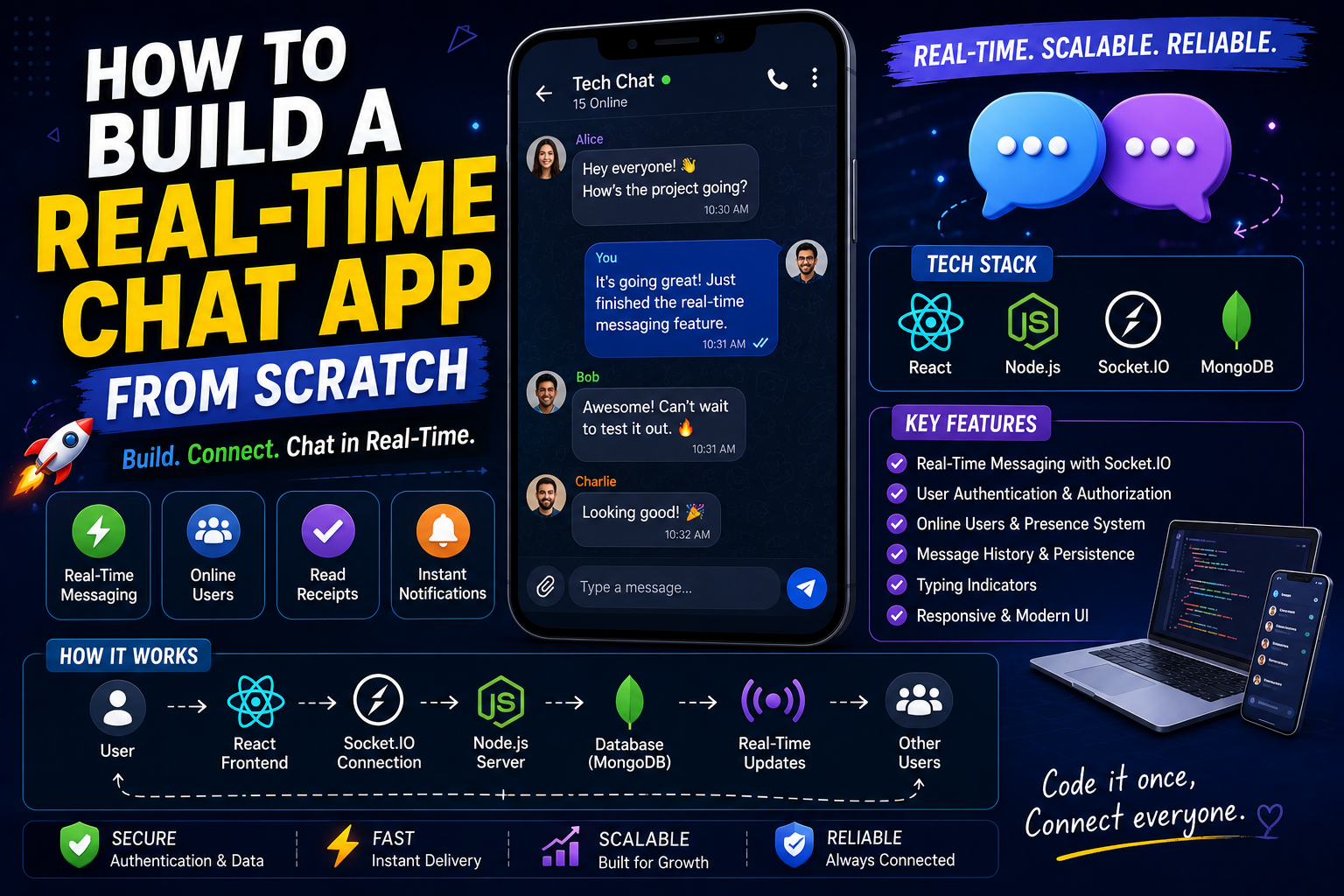
There’s something oddly satisfying about sending a message and then watching it show up right away on a different screen.
No refresh button.
No page reload.
No real waiting.
You just type, send, and boom — the message is delivered.
The first time I built a real-time chat application, I remember sitting there with two browser windows open, for like, almost ten minutes, doing basically nothing productive besides sending messages back-and-forth between them.
“Hello.”
“Testing.”
“Working?”
“Yes.”
It sounds kind of silly now, but at the time it genuinely felt… magical?
Because before that, most of what I made was pretty predictable.
Forms submitted.
Pages loaded.
Data appeared.
A chat application felt, I don’t know, alive. Something happened immediately.
Real people could talk.
Real data was moving.
Real-time applications are one of those projects that make you feel like you’re actually building software, not just following tutorial steps like a robot.
And yet, they’re also crazy easy to underestimate.
A simple chat UI looks straightforward.
But building a dependable real-time messaging system? That’s where it gets, well interesting.
Messages have to show up instantly.
Users have to stay connected.
Data has to be stored properly.
Connections can drop.
People can go offline.
And suddenly a “simple chat app” turns into a surprisingly useful learning exercise.
This article is basically everything I wish someone had told me before I built my first real-time chat application.
Not only the coding part.
The mistakes, the little head spins.
The frustrations.
The architecture choices that seem obvious only after.
The debugging nightmares.
And the lessons that finally made the whole thing click.
Because once you understand how a real-time chat app actually works, a lot of other modern applications start making sense too.
Why This Topic Matters
Most modern applications use some form of real-time communication.
Think about how many apps you use daily:
- Discord
- Slack
- Telegram
- Instagram DMs
- Facebook Messenger
Even platforms that aren’t traditional chat apps use real-time features:
- notifications
- live dashboards
- multiplayer games
- collaborative editors
- stock trackers
The underlying concepts are surprisingly similar.
Learning how to build a real-time chat app teaches:
- frontend development
- backend architecture
- database design
- authentication
- WebSockets
- scalability concepts
- user experience
Honestly, it’s one of the best projects for becoming a stronger full-stack developer.
My Experience: The First Chat App Disaster
Honestly, my first chat app was a mess.
Like, genuinely terrible.
The UI looked ok, at least at first glance.
Messages showed up too.
Everything seemed fine, for a while.
Then I opened two browser tabs, you know just to test things.
Suddenly the same messages duplicated in this weird way.
Some messages would vanish… like poof, gone.
Other messages came in the wrong order, not in any sensible pattern.
And users started getting disconnected randomly, as if the connection decided to quit.
So yeah, the whole system felt unstable, every minute.
At first, I blamed JavaScript.
Then React.
Then, eventually I blamed my backend.
But later i realized the real problem, and it was kinda obvious in hindsight:
I didn’t actually understand real-time systems.
I was building features first, before i understood the communication flow, and how everything talks to everything else.
That lesson stuck, probably because it hurt a bit.
Real-time development gets easier once you understand the system first, instead of guessing and hoping.
What Makes a Chat App “Real-Time”?
Before going deeper, let’s just simplify it.
Traditional websites usually work like this:
User requests data → server responds → connection ends, basically done
Chat apps work differently, more like constant back and forth.
The connection stays open.
The server and client remain linked.
Messages can move almost instantly, in both directions.
That ongoing interaction is what creates the “real-time” experience.
Without it, people would have to refresh the page again and again.
And nobody wants that, really.
The technology behind those real time chat apps
When people who are just starting out start researching chat applications, they run into terms like WebSockets, Socket.IO, Server-Sent Events, Pub/Sub, and even “Real-Time Database”.
At first, for me personally, all of it felt kinda intimidating, like there was way more going on than I was ready for.
But then I noticed something kinda obvious, almost too simple.
These tools aren’t magic. They’re basically different ways to help a client and a server talk fast.
For most beginner projects, Socket.IO is usually the gentlest place to begin.
And yeah, why is that?
Because it quietly wraps a lot of the complexity for you. So you can focus on building the chat features instead of wrestling with low level networking stuff, like reconnection edge cases and message transport details.
Honestly, that matters a lot when you’re learning.
Understanding the Core Architecture
Every real-time chat application contains a few basic components.
Frontend
Responsible for:
- displaying messages
- handling user input
- showing online status
- managing conversations
Usually built with:
- React
- Next.js
- Vue
- Angular
Backend
Handles:
- user authentication
- message routing
- connection management
- database communication
Usually built with:
- Node.js
- Express
- NestJS
Database
Stores:
- users
- conversations
- messages
- timestamps
Common choices include:
- MongoDB
- PostgreSQL
- Firebase
Real-Time Layer
The magic part.
Usually:
- Socket.IO
- WebSockets
- Firebase Realtime Database
This layer enables instant communication.
Biggest Mistakes I Made
Treating Chat Like a CRUD App
This was probably my biggest mistake.
I approached chat development the same way I approached:
- blogs
- dashboards
- forms
Chat applications behave differently.
Data changes constantly.
Users expect instant updates.
The mindset needs to change.
Ignoring Connection Failures
In development, internet feels stable.
Real users aren’t always connected perfectly.
Connections drop.
Networks switch.
Browsers refresh.
Ignoring these realities creates fragile applications.
I learned this painfully.
Forgetting Message Persistence
Early versions of my chat app stored messages only in memory.
Everything looked fine.
Until server restarted.
Every message disappeared.
Not a great user experience.
Persisting messages properly matters.
Step-by-Step: How to Build a Real-Time Chat App
Let’s break this into practical stages.
Step 1: Create Authentication
Before messaging, users need identities.
Basic authentication includes:
- signup
- login
- session management
Every message should belong to a specific user.
This makes future features easier.
Step 2: Create Chat UI
Start simple.
Build:
- message area
- input field
- send button
Don’t obsess over design initially.
Focus on functionality first.
Pretty interfaces can come later.
Working systems matter more.
Step 3: Build Backend API
Backend should manage:
- users
- conversations
- messages
Create endpoints for:
- fetching chats
- creating conversations
- loading message history
Even real-time apps still need traditional APIs.
Step 4: Integrate Socket.IO
This is where things become exciting.
When a user sends a message:
Frontend →
Socket →
Server →
Recipient
Instant communication begins.
Seeing this work for the first time feels incredibly rewarding.
Step 5: Store Messages
Every message should be saved.
Store:
- sender
- receiver
- content
- timestamp
This allows:
- history
- search
- synchronization
Without persistence, chat becomes unreliable.
Practical Example
Imagine building a student communication platform.
Students need to:
- message mentors
- ask questions
- receive updates
Workflow:
Student sends message →
Server receives →
Database stores →
Recipient receives instantly
Simple concept.
Powerful result.
Common Beginner Mistakes
Sending Too Much Data
One thing I learned quickly:
Not every update needs to be broadcast.
Sending unnecessary data increases:
- bandwidth usage
- server load
- complexity
Efficient communication matters.
No Typing Indicators
Interesting observation:
Users often expect small features.
Typing indicators seem minor.
Yet they make chat feel alive.
These details improve user experience significantly.
Ignoring Read Receipts
Again, not essential.
But practical.
Users like knowing:
- message delivered
- message seen
Modern chat expectations are surprisingly high.
What I Learned About Real-Time Systems
A few lessons became obvious over time.
Simplicity Wins
Complex architecture sounds impressive.
Simple architecture usually survives longer.
Especially early-stage projects.
Build only what users actually need.
User Experience Matters More Than Features
Fancy functionality means little if messaging feels unreliable.
Users forgive limited features.
They rarely forgive broken communication.
Reliability matters.
Real-Time Doesn’t Mean Everything Must Be Real-Time
Interesting lesson.
Some developers try making entire applications real-time.
Often unnecessary.
Use real-time communication where it provides value.
Not everywhere.
Scaling Challenges Nobody Talks About
Chat apps feel easy with:
- 2 users
- 10 users
- 50 users
Things change as usage grows.
Now you must think about:
- server load
- message queues
- horizontal scaling
- caching
Most beginners won’t need these immediately.
Still worth understanding conceptually.
Growth changes architecture.
Real Advice for Beginners
If you’re building your first chat app:
Don’t start with:
- voice calling
- video calling
- encryption
- group chats
- reactions
- advanced notifications
Build simple messaging first.
Master the basics.
Then expand.
This approach saves enormous frustration.
Trust me.
The Emotional Side of Making Chat Apps
Chat applications feel emotionally different from a lot of other work.
Why, you ask?
Because when something breaks it’s obvious, like right away.
A dashboard that’s messed up might slide by for a bit.
But if the message flow fails it gets spotted instantly.
Then people get annoyed, fast.
I still remember working on message delivery problems late at night, it was almost too quiet.
Everything seemed fine.
The logs said success.
Yet the messages still vanished.
Those moments really test patience.
However they also push your problem-solving ability forward, in a big way.
It’s kind of strange, real-time building forces persistence, even when it’s messy.
Future of Real-Time Applications
The desire for real-time experiences keeps growing, no doubt.
People now expect interactions in the moment, not later.
AI assistants, collaborative tools.
Live notifications that don’t wait.
Remote work platforms that depend on instant replies.
A lot of modern products are built on this kind of ongoing conversation.
If you learn these skills today, you end up with more doors open tomorrow.
And even as the tools change over time, the core ideas still matter.
Frequently Asked Questions
Should beginners use Firebase for chat apps?
Honestly, Firebase can be a great starting point.
It simplifies:
- authentication
- real-time updates
- hosting
Especially useful for MVPs and learning projects.
Is Socket.IO better than WebSockets?
For beginners, usually yes.
Socket.IO provides:
- reconnection support
- easier setup
- additional features
Raw WebSockets offer more control but require more work.
Can I build a chat app without a backend?
Not realistically for production.
Some backend component is almost always required for:
- authentication
- persistence
- user management
What I Learned After Multiple Chat Projects
Eventually I stopped seeing chat apps as messaging systems.
I started seeing them as communication systems.
That perspective changed everything.
Messages are only one part.
The real challenge involves:
- reliability
- scalability
- user trust
- responsiveness
Building these systems teaches valuable engineering habits.
And honestly, those habits transfer into almost every other project.
Final Thoughts
Making a real-time chat app is honestly one of those projects that ends up being super rewarding for a developer.
Not because chat apps are just trendy, you know.
But because it kinda drags you into really understanding how modern applications work, in practice.
You’ll end up picking up a bunch of pieces, like
- frontend architecture
- backend communication
- databases
- authentication
- real-time networking
and it’s all in one single project. Which is nice, because it keeps everything connected, in a way that feels real.
And maybe the biggest part, you’ll get that sense of satisfaction when something starts to feel alive.
That sort of feeling doesn’t really go away.
Even after you understand the exact mechanics, watching messages glide instantly between different users still feels a bit magical, yeah.
