There’s this moment every website owner kinda remembers, even if they don’t want to.
You wake up one morning, and you open your website expecting to check traffic, publish some content, or maybe review analytics real quick.
But instead… something’s off.
Not in a small “oh maybe it’s slow today” way. More like: what is happening.
A suspicious login attempt, out of nowhere.
Strange traffic spikes that don’t match anything you did.
Random, unknown files appearing on your server.
Or worse…
Your website is down.
And suddenly security is not some background topic anymore. It becomes real, like today real.
Not theoretical. Not “only for big companies” real. Not just for banks and institutions that have a whole team.
It becomes personal.
I still remember when I first started paying attention to website security, and honestly i ignored it for a long time.
Like a lot of beginner developers, I told myself hackers only go after huge companies.
Why would anyone bother with a small blog, or a startup page that maybe gets a couple visitors a day?
Turns out that’s exactly what many developers think before they learn the hard way.
Hackers don’t always aim at one specific website.
Sometimes they go after weak spots, just because they exist.
Sometimes it’s outdated plugins, or an old theme, or some script that never got updated.
And sometimes they just run automated bots, scanning thousands of websites every day, looking for easy openings… like it’s a routine.
Your website doesn’t have to be famous to become a target.
It just needs to be vulnerable. That’s it.
That realization changed how I build websites, completely.
So this article is basically everything I wish someone had told me earlier about website security.
No fear-based “buy this now” cybersecurity marketing.
No overly complicated security jargon either.
Just practical lessons, real mistakes, beginner-friendly explanations, and honest advice on how to secure your website from hackers without losing your sanity in the process.
Because security isn’t about living in paranoia.
It’s about being prepared.
Why this topic matters more than most developers realize
Back when I was still early in my development journey, I kept noticing this thing , that people seem to focus on features a lot more than security.
Like developers get a lot of joy out of building:
- dashboards
- authentication systems
- AI features
- beautiful UIs
- automation workflows
Security though… kinda feels boring by comparison.
Nobody really wakes up excited to configure security headers, not even once.
Nobody throws a victory post because they patched dependencies, i mean come on.
Nobody is out here sharing screenshots of updated firewall rules, it just does not “look cool” .
But security quietly protects everything, while everyone else is busy shipping.
Your:
- users
- content
- revenue
- reputation
- business
Depends on it
And honestly, the biggest threat isn’t some super sophisticated attacker in a movie, hoodies and dark rooms vibes.
It’s plain mistakes.
Tiny mistakes.
The kind of issues beginners make every day , and they do it without even noticing.
I certainly did , plenty of them.
My Experience: The Wake-Up Call
One of the biggest security lessons I learned came from a, pretty simple kind of incident.
I wasn’t hacked.
But I did see dozens of login attempts showing up in my logs.
Random usernames. Random passwords. And constant requests, like they didn’t slow down at all.
At first I ignored it, honestly. For a moment it felt like noise.
Then I realized something important, though it took me a while.
Nobody actually went looking for my website, not in a human sense.
Automated bots did.
They found it, and they were going through thousands of common password pairs automatically, over and over.
That moment kind of changed everything about how I looked at website security.
Because I finally understood a simple thing:
The internet gets scanned constantly.
Your website isn’t invisible.
Even if nobody visits it.
Bots go everywhere.
And bots never sleep.
The biggest security myth
The biggest myth, is like this:
“My website is too small to be targeted.”
Honestly, I thought it was true for years, like fully.
It’s totally wrong.
Most attacks now are automated, no surprise.
Bots don’t care if you’re running:
a blog
startup website
e-commerce store
portfolio site
They only care about weak points, not your size.
So an outdated plugin can be risky, whether it’s in a massive company, or in a small personal project.
That’s why security has to matter from day one.
Not later, not when the visitors finally show up.
Not after revenue starts.
From day one.
Understanding How Websites Usually Get Hacked
Before discussing protection, let’s understand reality.
Most websites don’t get hacked through Hollywood-style attacks.
Usually it’s much simpler.
Common causes include:
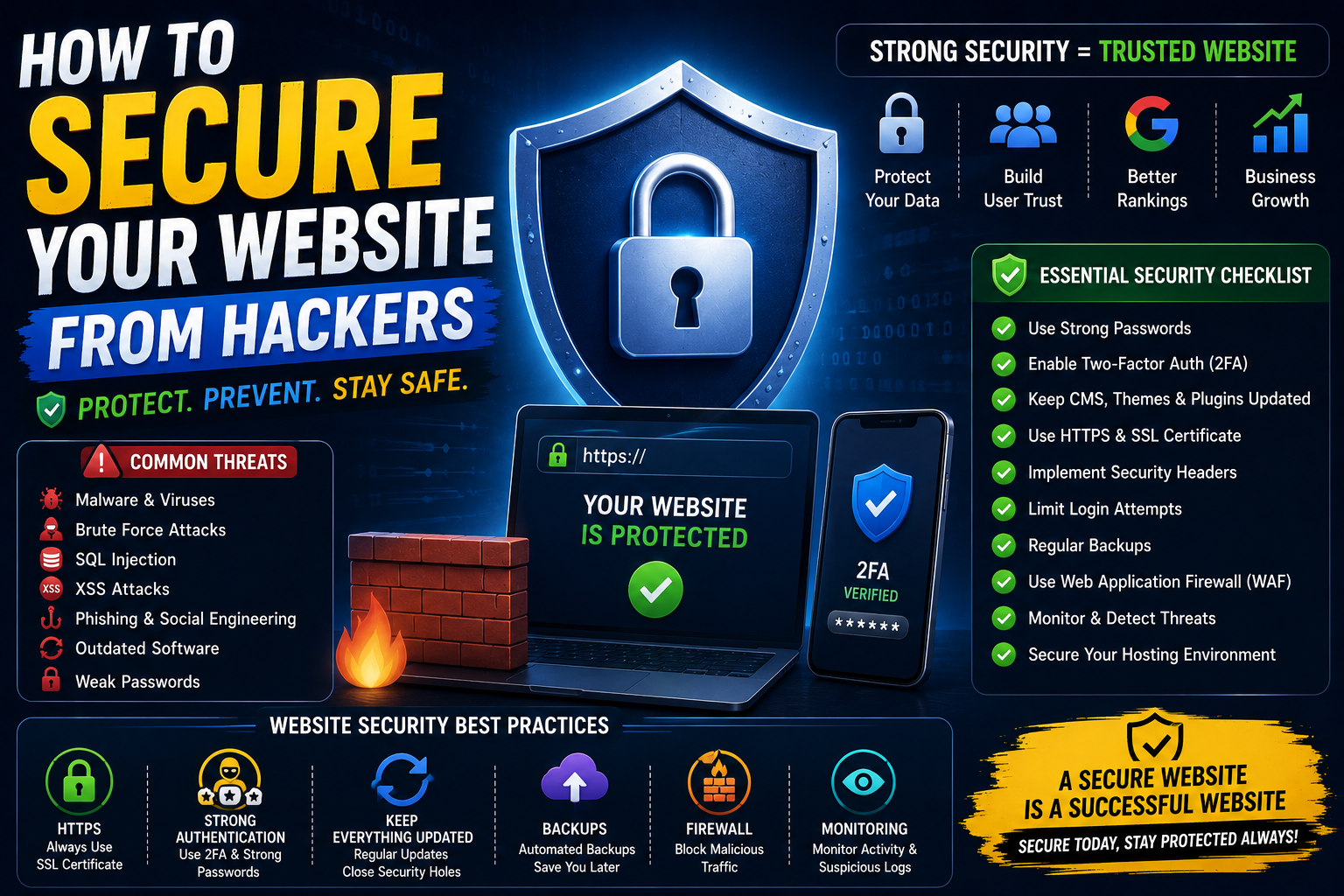
- Weak passwords
- Outdated software
- Vulnerable plugins
- Exposed API keys
- Poor authentication systems
- Misconfigured servers
- Social engineering
- Lack of updates
Notice something interesting?
Most attacks exploit human mistakes.
Not technical genius.
That’s actually good news.
Because mistakes can be fixed.
Understanding How Websites Usually Get Hacked
Before we talk about protection, lets first deal with reality, ok.
Most websites dont get hacked in those Hollywood style ways.
Honestly, it’s usually much simpler than that.
Common reasons look like this:
- Weak passwords, or reused ones
- Outdated software, still running old versions
- Vulnerable plugins, the kind that never get patched
- Exposed API keys, left where they shouldnt be
- Poor authentication systems
- Misconfigured servers, settings that are just too loose
- Social engineering, baiting people into “helping”
- A lack of updates, even when they’re available
Now notice something a little funny?
Most attacks take advantage of human errors.
Not some unstoppable technical genius.
And that’s kind of good news, because those slip ups can be corrected, step by step.
Biggest Mistakes I Made
Using Weak Passwords
I cringe a little when I try to remember this, its… a blur in some spots.
Early on in my journey , I reused passwords way too often.
Convenient ? Sure.
Safe? Not even close.
Because if one account gets compromised, then several other accounts quietly become vulnerable too. And it feels almost normal until it isnt.
Now I stick to:
- unique passphrases
- password managers
- two factor authentication
Every time. Without exception.
Ignoring Updates
This is, like, probably the most common wrong move most website owners make.
Updates feel kind of annoying.
They interrupt the flow, or whatever you were doing.
Sometimes they even cause new problems, bugs, chaos.
So it’s only natural that people keep postponing them.
I did the same too.
Then, I figured out that updates often include security repairs, not just “new features” or tweaks.
Which means attackers may already have knowledge about the weaknesses those updates actually fix.
So, if you delay updates, you’re increasing your risk, quietly and steadily.
Exposing Sensitive Information
Environment variables changed my life honestly.
Before understanding them properly, I occasionally exposed things that should never be public.
Examples:
- API keys
- secret tokens
- database credentials
Luckily nothing serious happened.
Still, it was a valuable lesson.
How to Secure Your Website Step by Step
This is the practical security framework I wish someone had explained earlier.
Step 1: Use Strong Passwords Everywhere
Sounds obvious.
Still incredibly important.
Good passwords should be:
- unique
- long
- random
Avoid:
- birthdays
- names
- common words
- predictable combinations
Password managers make this much easier.
Trying to memorize everything is unrealistic.
Step 2: Enable Two-Factor Authentication (2FA)
This single improvement dramatically increases security.
Even if someone discovers your password, they still need:
- authentication app
- security key
- verification code
That extra layer stops many attacks immediately.
Honestly, every important account should use 2FA.
Step 3: Keep Everything Updated
This includes:
- CMS
- plugins
- themes
- frameworks
- libraries
- server software
Updates aren’t only about new features.
They’re often security improvements.
Treat updates seriously.
Step 4: Use HTTPS Everywhere
HTTPS encrypts communication between users and your website.
Without HTTPS:
data can potentially be intercepted.
Modern hosting providers make SSL certificates relatively easy now.
There is almost no reason to run websites without HTTPS today.
Step 5: Protect Admin Areas
Admin panels attract constant attention from bots.
Practical protections include:
- strong passwords
- 2FA
- limited login attempts
- IP restrictions when possible
Admin access deserves special protection.
Why Authentication Security Matters
Authentication systems deserve extra attention because they control access.
Common mistakes include:
- storing passwords incorrectly
- weak session handling
- poor token management
One lesson I learned:
Never store passwords directly.
Always hash them.
Security starts with respecting user trust.
Practical Example: Login System Security
Imagine building a startup platform.
Users create accounts.
Bad implementation:
- plain passwords
- unlimited login attempts
- weak validation
Good implementation:
- password hashing
- rate limiting
- email verification
- secure sessions
Small differences.
Massive security impact.
Common Beginner Mistakes
Trusting User Input
This mistake causes countless vulnerabilities.
Users should never be trusted blindly.
Validate:
- forms
- uploads
- URLs
- API requests
Always.
Even if users seem legitimate.
Ignoring Backups
This one hurts.
Many website owners think:
“I’ll create backups later.”
Then disaster happens.
Good backups are boring until they’re priceless.
Create automatic backups.
Regularly.
Installing Random Plugins
Especially common with WordPress.
People install plugins because:
- convenient
- free
- feature-rich
But every plugin increases risk.
Use only necessary plugins from trusted sources.
Why Backups Are Security Too
People often separate backups and security.
I don’t.
Backups are part of security.
Because perfect protection doesn’t exist.
Even if something goes wrong:
- attack
- server failure
- accidental deletion
Backups provide recovery.
That safety net matters enormously.
Security Headers: Small Change, Big Impact
This topic intimidated me initially.
Security headers sound complicated.
In reality, they’re instructions browsers follow to improve protection.
Examples:
- Content Security Policy
- X-Frame-Options
- Strict-Transport-Security
You don’t need to memorize everything immediately.
Just understand they exist and help strengthen defenses.
Real Advice for Startup Founders
Founders often prioritize:
- growth
- traffic
- product features
Security gets delayed.
I’ve seen this repeatedly.
The problem?
Security debt behaves similarly to technical debt.
Ignoring it creates bigger problems later.
Security doesn’t need to be perfect.
It needs to be intentional.
Monitoring Matters More Than People Think
One lesson that surprised me:
Security isn’t only prevention.
It’s visibility.
You should know:
- who logs in
- failed login attempts
- suspicious activity
- server errors
Monitoring helps identify problems early.
Without monitoring, attacks can remain invisible.
What I Learned About Security
Over time, a few lessons became very clear.
Simplicity Is Often Safer
Complex systems create more opportunities for mistakes.
Simple architectures:
- easier to maintain
- easier to monitor
- easier to secure
Complexity isn’t automatically better.
Security Is a Process
Many beginners look for a security checklist.
Complete checklist.
Done forever.
Reality doesn’t work that way.
Security evolves continuously.
New threats appear.
Software changes.
Risks change.
Security is ongoing.
Most Problems Are Preventable
This realization is encouraging.
Many attacks succeed because of:
- neglected updates
- weak passwords
- exposed credentials
Basic practices prevent huge numbers of problems.
You don’t need military-grade infrastructure.
You need discipline.
Future of Website Security
The internet is getting, kinda more complex, every year.
AI tools are helping developers build faster ,and with less friction.
But oddly enough, they’re also helping attackers too. Like the same gears just turning in a different direction.
So yeah, security awareness becomes even more important, seriously.
In the next wave of development, people will need things like
secure coding routines
a solid grasp of authentication
monitoring know-how
infrastructure awareness
Security won’t just sit there as an option.
It will become more essential. More like a basic requirement, not an extra.
Real Advice I Wish Someone Told Me Earlier
Don’t wait until something bad happens.
That’s probably the biggest lesson. Honestly.
Security feels invisible when everything is running.
Then, suddenly it turns urgent, and you’re scrambling.
Proactive security is usually way easier than reactive recovery
And another thing, because people forget this part:
Don’t let fear overwhelm you.
Website security can seem enormous at first, like too much to even start.
Start small, do one improvement
Then keep going, step by step
Small wins add up.
Consistency matters way more than perfection, at least most of the time.
Frequently Asked Questions
Can a small blog get hacked?
Yes.
Automated bots scan websites constantly.
Traffic size doesn’t determine vulnerability.
Security practices do.
Is HTTPS enough to secure a website?
No.
HTTPS is important but only one piece of security.
You still need:
- strong passwords
- updates
- backups
- authentication protection
Should beginners worry about website security?
Absolutely.
Not obsessively.
But definitely intentionally.
Good habits formed early save problems later.
Final thoughts
Website security is one of those topics developers usually postpone, until reality sorta taps them on the shoulder and then, yeah, it becomes a thing. I get it.
Building features feels exciting, every new button or workflow looks like progress. Security however seems invisible. Like it’s always “later”, or it’s happening somewhere else, not in your code, not in your day.
But after years of building websites and other online projects, I’ve learned something, fairly clear:
Users hand us their information. Like, they really do.
That trust actually matters.
And protecting websites isn’t only about blocking hackers or chasing threats at night.
It’s also about guarding:
- users,
- businesses
- content
- the work itself (effort)
- and your reputation
Also, honestly, a lot of the most meaningful security improvements aren’t that complicated. Strong passwords. Regular updates. Backups. HTTPS. Good authentication protection.
Small routines, when repeated, become a surprisingly sturdy foundation.
