A few years ago, building a SaaS product felt almost impossible without money.
You needed:
- developers
- servers
- paid APIs
- hosting
- designers
- expensive software tools
Basically:
“No funding = no startup.”
At least that’s what many people believed.
Honestly, I used to think the same.
When I started exploring SaaS seriously, I thought:
“How do small founders even launch products without huge investment?”
Then slowly I discovered something interesting.
The internet today is filled with:
- free developer tools
- generous startup tiers
- open-source software
- AI tools
- cloud free plans
And suddenly it became possible for one person to build surprisingly powerful SaaS products with almost zero upfront cost.
Not fake motivational “build unicorn overnight” nonsense…
but real practical MVPs.
In this article, I’ll explain the best free tools to build SaaS without investment — deeply, honestly, and from a real founder/developer perspective.
By the end, you’ll understand:
- what tools you actually need
- how free SaaS stacks work
- where free plans are enough
- where they eventually fail
- mistakes beginners make
- realistic expectations
- how solo founders launch products cheaply
Let’s start from the beginning.
What Is SaaS?
Before tools, let’s simplify SaaS itself.
SaaS means:
Software as a Service
Instead of downloading software permanently…
users access it online through browser/apps.
Examples:
- Notion
- Canva
- Grammarly
- Trello
- ChatGPT
- Figma
Usually subscription-based.
That’s SaaS.
Why SaaS Became So Popular
Because recurring revenue is powerful.
Instead of:
- selling software once
SaaS businesses earn monthly recurring income.
That’s why developers and founders love SaaS models.
Even small tools can become profitable if:
- problem is real
- users return regularly
My Experience Trying to Build SaaS Initially
Honestly?
At first I overcomplicated everything.
I thought I needed:
- microservices
- Kubernetes
- expensive servers
- huge backend architecture
before launching anything.
Huge mistake.
Most successful early SaaS products start much simpler than people imagine.
The real challenge usually isn’t:
“How do I scale to 10 million users?”
It’s:
“Can I get even 10 people to care?”
That realization changed how I approach product building completely.
What You Actually Need to Build a SaaS
Most SaaS apps need only a few core things.
1. Frontend
What users see.
2. Backend
Logic and APIs.
3. Database
Store user data.
4. Authentication
Login/signup system.
5. Hosting
Where app runs.
6. Payments
Subscriptions/billing.
That’s basically the core stack.
And surprisingly…
many free tools now cover these parts.
Best Free Frontend Tools
Let’s start with frontend.
Probably the most important free developer tool.
Honestly hard to beat.
Features:
- extensions
- Git integration
- debugger
- terminal
- AI tools
Still crazy that it’s free.
2. Figma
Free tier is amazing for:
- UI design
- wireframes
- prototypes
Even many funded startups use Figma heavily.
3. React
Still one of the best frontend frameworks.
Huge ecosystem.
Massive community.
Free forever.
Perfect for SaaS dashboards and web apps.
4. Tailwind CSS
This changed frontend speed massively for many developers.
Instead of writing endless CSS:
- utility classes speed everything up.
Especially useful for SaaS dashboards.
My Frontend Learning Mistake
Initially I wasted months trying:
- too many frameworks
- random UI libraries
- unnecessary complexity
Eventually I realized:
consistency matters more than chasing trends.
Pick stack.
Build products.
Repeat.
Best Free Backend Tools
This is where things became much easier recently.
5. Supabase
Honestly one of the best free backend tools right now.
Provides:
- PostgreSQL database
- authentication
- APIs
- storage
- realtime features
Feels like:
Firebase but more developer-friendly.
Perfect for SaaS MVPs.
6. Firebase
Still massively popular.
Very beginner-friendly.
Useful for:
- authentication
- database
- notifications
- hosting
Especially good for rapid prototyping.
7. Node.js
If you want more backend control, Node.js remains powerful.
Free.
Huge ecosystem.
Great for SaaS APIs.
Why Backend Feels Scary to Beginners
Because backend sounds:
- complex
- server-heavy
- infrastructure-focused
But modern backend tools simplified many things massively.
You don’t always need:
- full DevOps setup
- custom auth systems
- database clusters
Initially simple is better.
Best Free Hosting Platforms
Hosting used to be expensive for beginners.
Now?
Way easier.
8. Vercel
Perfect for:
- React apps
- Next.js projects
- SaaS dashboards
Deployment feels almost magical.
Push GitHub repo…
website goes live.
9. Netlify
Very beginner-friendly hosting platform.
Great for:
- frontend hosting
- serverless functions
- landing pages
10. Render
Useful for:
- backend APIs
- databases
- Docker apps
Good free tier for learning and MVPs.
My Hosting Realization
I used to think:
“Real developers manage Linux servers manually.”
Now honestly?
Managed platforms save enormous time.
Especially for founders trying to move quickly.
Best Free Database Options
Databases are critical for SaaS.
11. PostgreSQL
Still one of the best databases.
Reliable.
Scalable.
Free.
Loved by developers.
12. MongoDB
Very beginner-friendly for JSON-style data.
Popular among JavaScript developers.
Which Database Should Beginners Choose?
Honestly?
Most beginners overthink this.
For SaaS:
- PostgreSQL is usually safer long-term
MongoDB is fine too.
Just avoid endless “database wars.”
Build first.
Best Free Authentication Tools
Authentication is annoying to build manually.
Thankfully tools exist.
13. Clerk
Modern auth solution.
Beautiful UI.
Easy integration.
Developer-friendly.
14. Auth0
Powerful auth platform.
Free tier useful for MVPs.
15. Supabase Auth
Supabase auth is honestly very convenient for startups.
Simple setup.
Works well.
Best Free AI Tools for SaaS Builders
AI now helps solo founders massively.
16. ChatGPT
Useful for:
- brainstorming
- debugging
- writing copy
- generating boilerplate
- explaining errors
But again:
don’t blindly trust everything.
17. GitHub + Open Source
GitHub is underrated as learning resource.
You can study:
- real SaaS codebases
- UI ideas
- backend architecture
- open-source templates
for free.
Best Free Payment Options
Eventually SaaS needs monetization.
18. Stripe
Stripe is insanely developer-friendly.
Excellent APIs.
Clean documentation.
Free to integrate.
Charges only when transactions happen.
19. Razorpay
Popular for Indian startups.
Useful if your users are mostly Indian.
Biggest SaaS Mistake Beginners Make
This is VERY important.
Most beginners focus too much on:
- technology
- stacks
- frameworks
instead of:
- solving real problems
A mediocre tech stack solving real pain wins more often than:
perfect architecture nobody wants.
Harsh truth honestly.
Mistakes I Made While Building Projects
Definitely many.
1. Overengineering Too Early
Classic developer disease.
Trying to build:
- scalable architecture
- advanced systems
- enterprise structure
before validating idea.
2. Too Many Tools
I kept switching:
- frameworks
- databases
- hosting
Nothing shipped.
Bad cycle.
3. Ignoring UI/UX
Even technically strong products fail if:
- confusing
- ugly
- frustrating
User experience matters heavily.
4. Building Before Validation
Huge mistake.
Build small.
Validate quickly.
5. Thinking Free Tools Mean “Cheap Products”
Some free stacks are incredibly powerful now.
Don’t underestimate them.
What I Learned About SaaS Building
One major realization changed my mindset:
Speed of execution matters more than perfect setup initially.
Especially for early-stage founders.
Because users don’t care whether you used:
- Kubernetes
- PostgreSQL clusters
- enterprise architecture
They care:
“Does this solve my problem?”
That’s what matters first.
Can You Really Build SaaS Without Investment?
Honestly?
Yes.
Especially MVP-stage SaaS.
Today one person can build:
- frontend
- backend
- auth
- hosting
- payments
mostly free.
The real investment becomes:
- time
- consistency
- learning
- execution
Not necessarily money initially.
Real Advice for Beginners
If you want to build SaaS:
stop consuming endless startup content.
Actually build something tiny.
Seriously.
Even:
- simple expense tracker
- AI tool wrapper
- PDF utility
- productivity app
- dashboard
teaches more than months of passive learning.
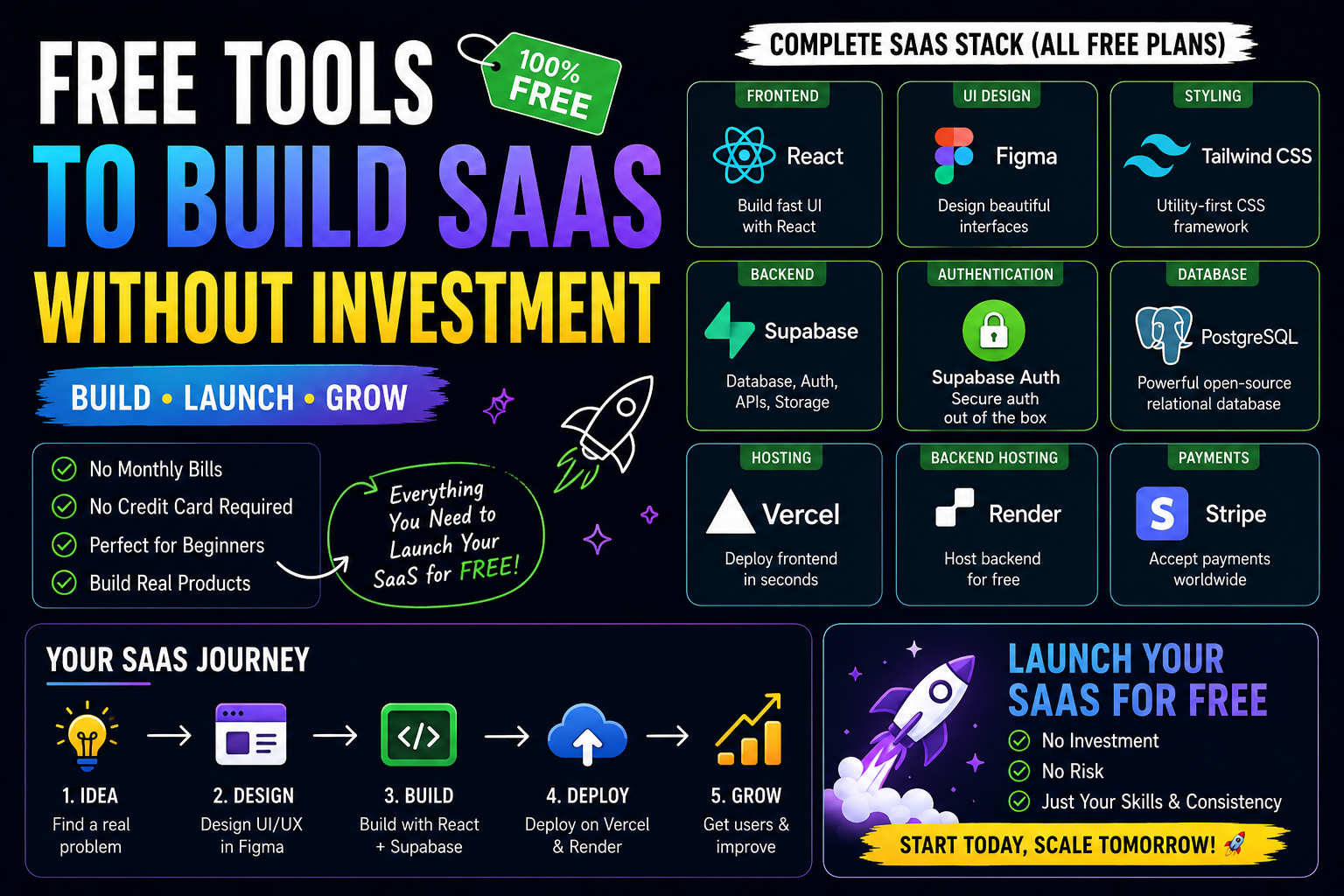
Simple Beginner SaaS Stack (Free)
Here’s a practical stack I’d recommend:
Frontend
- React
- Tailwind CSS
Backend
- Supabase
Hosting
- Vercel
Auth
- Supabase Auth
Payments
- Stripe
Simple.
Modern.
Free-friendly.
Enough to launch real MVPs.
The Future for Solo SaaS Builders
Honestly?
This is one of the best times ever to build products.
Because:
- AI accelerates coding
- cloud services are cheaper
- no-code tools exist
- deployment is easier
- learning resources are everywhere
One skilled person can now build things that previously required teams.
That’s incredibly exciting.
Final Thoughts
Building SaaS products used to feel inaccessible for many people.
Now?
The barrier is much lower.
And while free tools won’t magically build successful businesses automatically…
they DO remove many technical and financial obstacles.
That means more people can:
- experiment
- validate ideas
- launch products
- learn by building
And honestly…
that’s a very good thing for innovation.
