There’s one moment almost every beginner developer remembers very clearly.
You finally build a beautiful frontend.
Buttons working.
Cards looking clean.
Animations smooth.
Navbar responsive.
And then suddenly reality hits.
“How do I actually connect this with the backend?”
That moment feels confusing in a very specific way.
Because until then, frontend and backend often feel like two completely different worlds.
Frontend tutorials show:
- components
- UI
- styling
- state management
Backend tutorials show:
- APIs
- databases
- authentication
- servers
But nobody properly explains the bridge between them in a simple practical way.
I still remember the first time I tried connecting a React frontend with a Node.js backend.
Absolute chaos.
CORS errors.
Fetch failures.
Undefined responses.
JSON parsing issues.
Wrong endpoints.
Environment variable confusion.
At one point I genuinely thought:
“Maybe backend is not for me.”
And honestly, many beginners feel this frustration because connecting frontend with backend is the stage where development suddenly starts feeling “real.”
Until then, you’re mostly building isolated pieces.
Now suddenly:
- data moves
- users authenticate
- databases store information
- APIs communicate
- applications become dynamic
This is where web development actually starts becoming exciting.
And also slightly painful.
This article is basically everything I wish someone had explained to me earlier in a practical human way — not textbook networking theory, not robotic API definitions.
Just real developer explanations, mistakes, frustrations, workflows, and lessons from actually struggling through this phase.
Because once this concept clicks properly, web development starts making much more sense.
Why This Topic Confuses Beginners So Much
The biggest reason beginners struggle here is because frontend and backend are usually taught separately.
Frontend courses say:
“Here’s React.”
Backend courses say:
“Here’s Express and MongoDB.”
But nobody slows down and explains:
“How do these two actually talk to each other?”
And honestly, this communication layer is where many developers get overwhelmed initially.
Especially when terms like:
- APIs
- endpoints
- requests
- responses
- JSON
- authentication
- headers
Start appearing everywhere.
I remember opening browser DevTools for the first time and feeling like I was looking at hacker-level complexity.
Now it feels normal.
But initially? Very intimidating.
What Frontend and Backend Actually Mean
Before connecting them, let’s simplify the concept first.
A frontend is what users see and interact with.
Examples:
- buttons
- forms
- pages
- dashboards
- UI components
Technologies:
- HTML
- CSS
- JavaScript
- React
- Vue
- Next.js
The backend is where:
- logic runs
- databases connect
- authentication happens
- data gets processed
Technologies:
- Node.js
- Express
- Django
- Laravel
- Spring Boot
Frontend = presentation.
Backend = processing and data handling.
The connection between them usually happens through APIs.
That’s the bridge.
My Experience: The First Time Things Finally Clicked
The first time frontend-backend communication finally made sense to me was during a simple login project.
Initially I kept treating frontend and backend like separate applications.
Then suddenly I realized something simple but powerful:
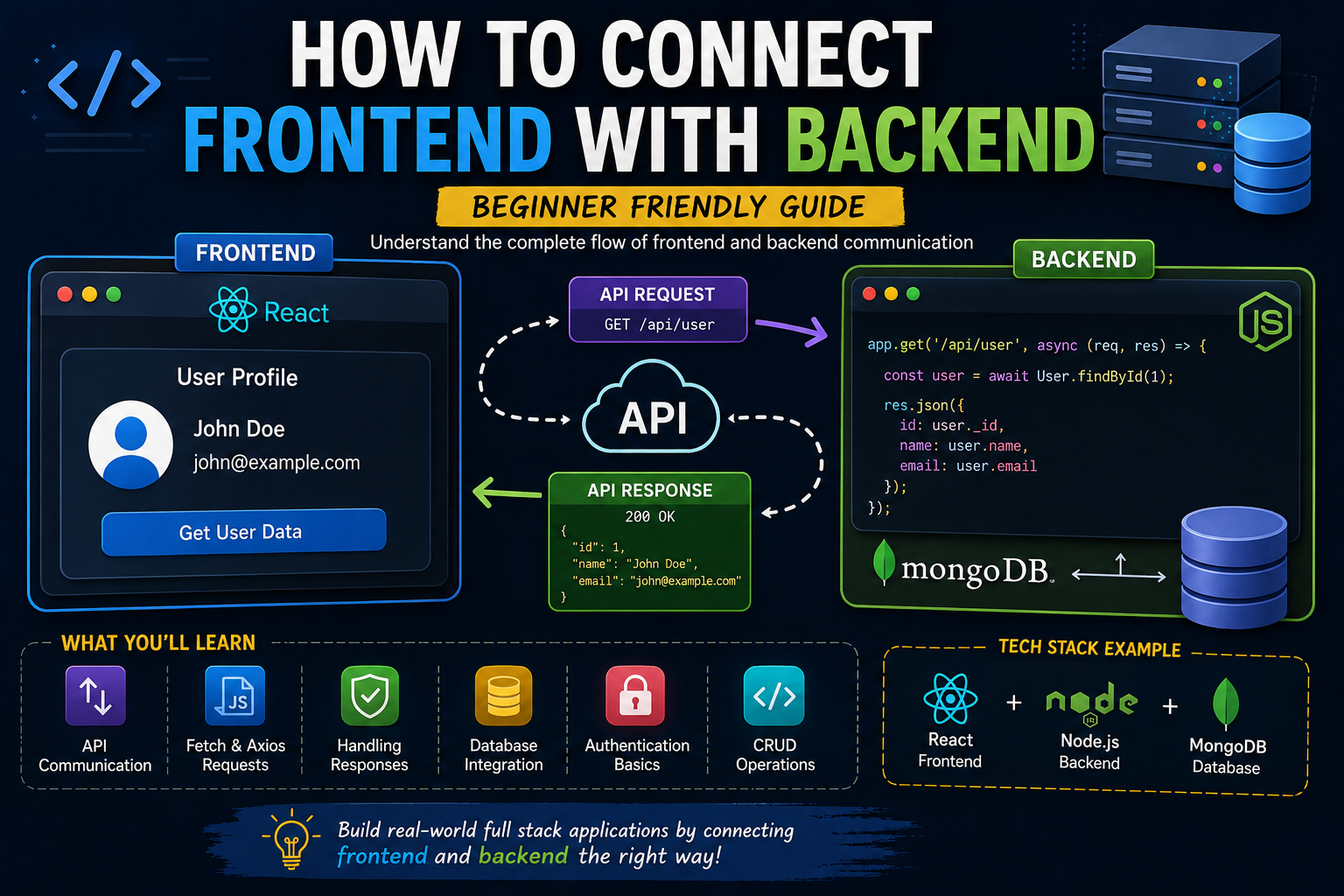
The frontend is basically requesting information from the backend.
That’s it.
The backend responds.
Frontend displays or uses the data.
This mental model simplified everything for me.
Before that realization, APIs felt mysterious.
After that realization, APIs started feeling like structured conversations between two systems.
The Simplest Real-World Analogy
Think about a restaurant.
Frontend = customer table.
Backend = kitchen.
The customer places an order.
The kitchen prepares food.
Then the response comes back.
Similarly:
- frontend sends request
- backend processes request
- backend sends response
- frontend displays result
Simple concept.
Huge importance.
What APIs Actually Do
This is where many beginners get stuck.
API sounds complicated.
Honestly, it’s not.
An API is simply a way for frontend and backend to communicate.
Example:
Your frontend sends:
“Give me user profile data.”
Backend responds:
“Here’s the data.”
Usually in JSON format.
That’s basically it.
Example of Real Flow
Imagine a login form.
User enters:
- password
Frontend sends this data to backend.
Backend checks database.
If correct:
- sends success response
- maybe returns token
Frontend receives response and logs user in.
This process is happening constantly in modern apps.
And once you understand this cycle, development becomes much less scary.
Biggest Mistakes I Made
Trying to Learn Everything at Once
Huge mistake.
I tried learning:
- React
- Express
- MongoDB
- authentication
- deployment
- JWT
All simultaneously.
Brain overload happened quickly.
Now I think beginners should first understand simple request-response flow deeply before advanced concepts.
Ignoring Browser DevTools
This slowed me down badly.
Network tab is incredibly important.
It shows:
- requests
- responses
- errors
- status codes
Once I started using DevTools properly, debugging became much easier.
Fear of Errors
CORS errors especially felt terrifying initially.
I used to panic whenever long red errors appeared in console.
Now honestly most errors are just clues.
Debugging becomes easier with experience.
Step-by-Step: How Frontend Connects With Backend
This is the practical explanation I wish someone had given earlier.
Step 1: Backend Creates an API Endpoint
Example:/api/users
This endpoint can send user data.
Backend listens for requests here.
Step 2: Frontend Sends Request
Usually using:
- fetch()
- axios
Example:
Frontend asks:
“Give me users.”
Step 3: Backend Processes Request
Backend may:
- query database
- validate input
- process logic
Then prepares response.
Step 4: Backend Sends Response
Usually JSON.
Example:
{
  "name": "Ashish",
  "role": "Developer"
}
Step 5: Frontend Uses Data
Frontend displays:
- profile
- dashboard
- list
- UI updates
That’s the complete cycle.
Simple concept.
Massive importance.
Why JSON Matters So Much
JSON confused me initially because tutorials kept mentioning it without explaining why it matters.
JSON is simply structured data format.
Easy for frontend and backend both to understand.
Almost every modern web app uses JSON communication.
Example:
{
  "title": "Blog Post",
  "author": "Ashish"
}
Very readable.
Very common.
GET, POST, PUT, DELETE Explained Simply
These terms overwhelmed me initially too.
Simple breakdown:
GET → fetch data
POST → create data
PUT → update data
DELETE → remove data
That’s it.
Beginners often overcomplicate HTTP methods mentally.
Real Practical Example
Let’s say you build a blog website.
Frontend:
Shows articles.
Backend:
Stores articles in database.
Frontend sends:
“Give latest articles.”
Backend responds with article data.
Frontend renders articles dynamically.
Now your website becomes real application instead of static pages.
That transition feels exciting.
Why Beginners Get CORS Errors
Ah yes…
The legendary beginner nightmare.
CORS errors frustrated me badly initially.
Simple explanation:
Frontend and backend running on different origins need permission to communicate.
Example:
Frontend:localhost:3000
Backend:localhost:5000
Browser blocks communication unless backend allows it.
This sounds scary initially but becomes routine later.
Authentication: Where Things Become More Real
Connecting frontend and backend becomes truly interesting when authentication enters.
Login systems involve:
- frontend forms
- backend validation
- database checks
- tokens
- protected routes
This phase overwhelmed me initially because suddenly security matters too.
But honestly, authentication is one of the best learning experiences for developers because it forces understanding of:
- request flow
- sessions
- APIs
- databases
- frontend state
Common Beginner Mistakes
Hardcoding Everything
I used to hardcode API URLs everywhere.
Terrible habit.
Environment variables exist for reason.
Ignoring Error Handling
Initially I only handled success responses.
Then real-world failures appeared.
Good applications handle:
- failed requests
- invalid responses
- server downtime
- network issues
Graceful handling matters massively.
Overcomplicating Architecture Early
Beginners often copy advanced folder structures immediately.
Simple systems are easier to understand initially.
Complexity can come later.
What I Learned About Full-Stack Development
One realization changed everything for me:
Frontend and backend are not enemies.
They are teammates.
Understanding both sides improves development massively.
Frontend developers who understand APIs build better interfaces.
Backend developers who understand frontend build better systems.
The communication layer connects everything.
Practical Workflow I’d Recommend Beginners
If I were starting again today, here’s honestly how I’d learn this.
Step 1: Build Simple Backend
Node.js + Express.
Create:
- one route
- simple response
Example:/api/test
Return:
{
  "message": "Backend working"
}
Step 2: Connect Frontend Using Fetch
React frontend sends request.
Display response on page.
Once this works, confidence increases massively.
Step 3: Add Database
Store:
- users
- posts
- products
Now backend becomes dynamic.
Step 4: Build CRUD Operations
Create.
Read.
Update.
Delete.
This phase teaches most practical skills.
Step 5: Add Authentication
Now things start feeling like real applications.
The Emotional Side of Learning This
Honestly, this phase emotionally frustrates many beginners.
Because frontend-backend bugs can feel invisible.
Sometimes:
- backend works
- frontend fails
Sometimes:
- frontend works
- API breaks
Sometimes:
- database issues appear
You feel stuck often.
I’ve had moments where tiny mistakes wasted entire evenings.
Missing slash.
Wrong route.
Incorrect headers.
Tiny bugs.
Huge frustration.
But slowly debugging becomes easier.
Patterns start repeating.
Confidence grows.
Real Advice I Wish Someone Told Me Earlier
Stop memorizing tutorials blindly.
Understand the flow deeply.
That matters more than syntax initially.
Another important thing…
Build small projects repeatedly.
Tiny applications teach more than endless theory.
Examples:
- todo app
- notes app
- blog system
- auth system
Repetition builds intuition.
And maybe the biggest lesson:
Errors are not proof you’re bad developer.
Errors are literally part of development.
Every experienced developer still debugs constantly.
Future of Frontend-Backend Development
AI tools are making coding faster now.
But understanding architecture and communication still matters massively.
Because even AI-generated apps rely on:
- APIs
- requests
- backend logic
- databases
Developers who deeply understand systems will continue having huge advantages.
Foundations matter.
Final Thoughts
Connecting frontend with backend is one of the biggest turning points in a developer’s journey.
Because suddenly web development stops feeling like isolated tutorials and starts feeling like real software engineering.
And honestly… once this concept clicks properly, confidence increases massively.
You begin understanding:
- how apps work
- how APIs communicate
- how data flows
- how real systems connect
That understanding opens many doors.
SaaS.
Dashboards.
Full-stack apps.
Authentication systems.
Admin panels.
Everything starts becoming more understandable.
