There’s a very specific kind of pain every developer experiences at some point.
Your app works perfectly on localhost.
Frontend smooth.
Backend running.
Database connected.
Authentication working.
You feel proud finally.
Then comes the next step:
“Now deploy it.”
And suddenly everything breaks.
Environment variables missing.
CORS errors appear.
Build fails.
Database connection crashes.
Frontend can’t talk to backend anymore.
Deployment logs look like alien language.
I still remember my first real full stack deployment experience because honestly… it was frustrating enough to make me question whether I actually understood web development at all.
Locally everything looked professional.
Online? Disaster.
That’s the moment many beginners realize an uncomfortable truth:
Building an app and deploying an app are completely different skills.
And deployment is where projects start becoming “real.”
Until deployment, your app mostly exists safely inside your machine.
Once deployed:
- users can access it
- servers matter
- scalability matters
- security matters
- performance matters
- uptime matters
This phase changes how you think as a developer.
And honestly, deployment tutorials online often skip the most important part:
the emotional chaos beginners experience while trying to make their app work on the internet for the first time.
This article is basically everything I wish someone had explained to me earlier about deploying full stack applications on cloud platforms — not only commands and hosting steps, but also:
- mistakes
- frustrations
- practical workflows
- mental models
- real-world lessons
Because deployment becomes much less scary once you understand what’s actually happening behind the scenes.
Why Deployment Feels So Difficult Initially
The biggest reason deployment feels overwhelming is because local development hides complexity.
On localhost:
- frontend and backend communicate easily
- databases feel simple
- files exist locally
- environment behaves predictably
Cloud deployment changes all of that.
Now suddenly:
- frontend may live on one server
- backend on another
- database somewhere else entirely
And all three must communicate correctly.
That shift confuses many beginners.
Especially when concepts like:
- domains
- DNS
- environment variables
- cloud instances
- CI/CD
- SSL
- reverse proxies
Start appearing everywhere.
I remember staring at deployment dashboards initially thinking:
“Why does this feel 10x harder than coding the app itself?”
Because honestly… deployment introduces infrastructure thinking.
And infrastructure feels intimidating at first.
What Cloud Deployment Actually Means
Before going deeper, let’s simplify the idea.
Deploying an app means:
making your application accessible on the internet through cloud servers.
Instead of running only on your laptop, the app runs on remote machines managed by cloud providers.
Examples:
- Vercel
- Render
- Railway
- AWS
- DigitalOcean
- Netlify
These platforms host your application so users worldwide can access it.
That’s deployment in simple terms.
My Experience: The First Deployment Disaster
One of my earlier projects taught me deployment reality very brutally.
Locally:
Everything worked perfectly.
I deployed frontend.
Success.
Then backend failed.
Then database connection broke.
Then frontend API requests stopped working.
I spent hours debugging.
Eventually I discovered:
one wrong environment variable caused the entire chain to fail.
Tiny mistake.
Massive frustration.
That experience taught me something important:
Deployment problems are often not “big technical failures.”
Usually they’re:
- missing configs
- wrong URLs
- environment mismatches
- permission issues
Small details matter massively.
The Biggest Misunderstanding About Deployment
Many beginners think deployment means:
“Upload code somewhere.”
Not exactly.
Real deployment involves:
- hosting frontend
- hosting backend
- connecting database
- configuring environments
- managing domains
- handling security
- optimizing performance
You’re basically creating an ecosystem where multiple systems communicate reliably.
That’s why deployment feels overwhelming initially.
Frontend vs Backend Deployment
Understanding this separation helped me massively.
Frontend deployment usually means:
hosting static files or frontend framework output.
Examples:
- React
- Next.js
- Vue
Frontend hosting platforms:
- Vercel
- Netlify
Backend deployment means:
hosting server-side logic.
Examples:
- Express.js
- Django
- Laravel
Backend hosting platforms:
- Railway
- Render
- DigitalOcean
- AWS
This separation becomes important because frontend and backend often deploy differently.
Why Modern Cloud Platforms Changed Everything
Honestly, deployment used to be far more difficult.
Developers manually configured:
- Linux servers
- Nginx
- Apache
- firewall rules
- SSL certificates
Now platforms simplified many things massively.
Today beginners can deploy full stack apps surprisingly fast using:
- Vercel
- Render
- Railway
- Supabase
That’s amazing.
But there’s still a hidden challenge:
understanding what these platforms automate for you.
Because once things break, you still need foundational understanding.
Biggest Mistakes I Made
Deploying Without Understanding Environment Variables
This mistake caused endless frustration initially.
Locally you use:.env
Cloud platforms require separate environment configuration.
If variables are missing:
- APIs fail
- authentication breaks
- databases disconnect
I learned painfully that environment management is critical.
Hardcoding URLs
Classic beginner mistake.
I used localhost URLs everywhere.
Then deployment failed instantly.
Your deployed frontend cannot call:localhost:5000
Because localhost only exists on your machine.
This mistake confuses almost everyone initially.
Ignoring Logs
Logs are incredibly important.
Initially I avoided reading deployment logs because they looked intimidating.
Huge mistake.
Logs often tell you exactly what broke.
Learning to read logs improved my debugging massively.
Step-by-Step: How Full Stack Deployment Actually Works
This is the practical explanation I honestly wish someone had given me earlier.
Step 1: Prepare Frontend
Frontend should:
- build successfully
- use environment variables properly
- call production backend URL
For React/Next.js apps:
Usually run build process first.
Platforms like Vercel automate much of this.
Step 2: Prepare Backend
Backend must:
- expose APIs publicly
- connect securely to database
- handle production requests
Important things:
- CORS setup
- environment variables
- production database connection
Backend deployment is where many beginners struggle initially.
Step 3: Deploy Database
Your app database must also exist online.
Popular choices:
- MongoDB Atlas
- Supabase
- PostgreSQL providers
Locally stored databases won’t work for public apps.
This realization confused me initially too.
Step 4: Connect Everything
Frontend → Backend → Database
All communication paths must work correctly.
This is where deployment becomes real systems engineering.
Understanding Environment Variables Properly
This topic deserves special attention because beginners constantly struggle here.
Environment variables store sensitive or configurable values like:
- API keys
- database URLs
- JWT secrets
Instead of hardcoding them inside code.
Example:
DATABASE_URL=your_database_url
JWT_SECRET=your_secret
Cloud platforms usually provide dashboards to configure these variables.
Missing one variable can break entire app.
Painful lesson.
Understanding Production vs Development
This confused me badly initially.
Development environment:
local machine setup.
Production environment:
real deployed application.
Things behave differently between them.
Examples:
- file systems
- API URLs
- security settings
- build optimizations
This is why apps working locally may fail after deployment.
Very common beginner experience.
What CORS Actually Means During Deployment
Ah yes…
The legendary deployment frustration.
CORS errors happen because browsers restrict requests between different origins.
Example:
Frontend:myapp.vercel.app
Backend:api.render.com
Backend must explicitly allow frontend requests.
Initially this error felt terrifying.
Now it’s mostly routine configuration.
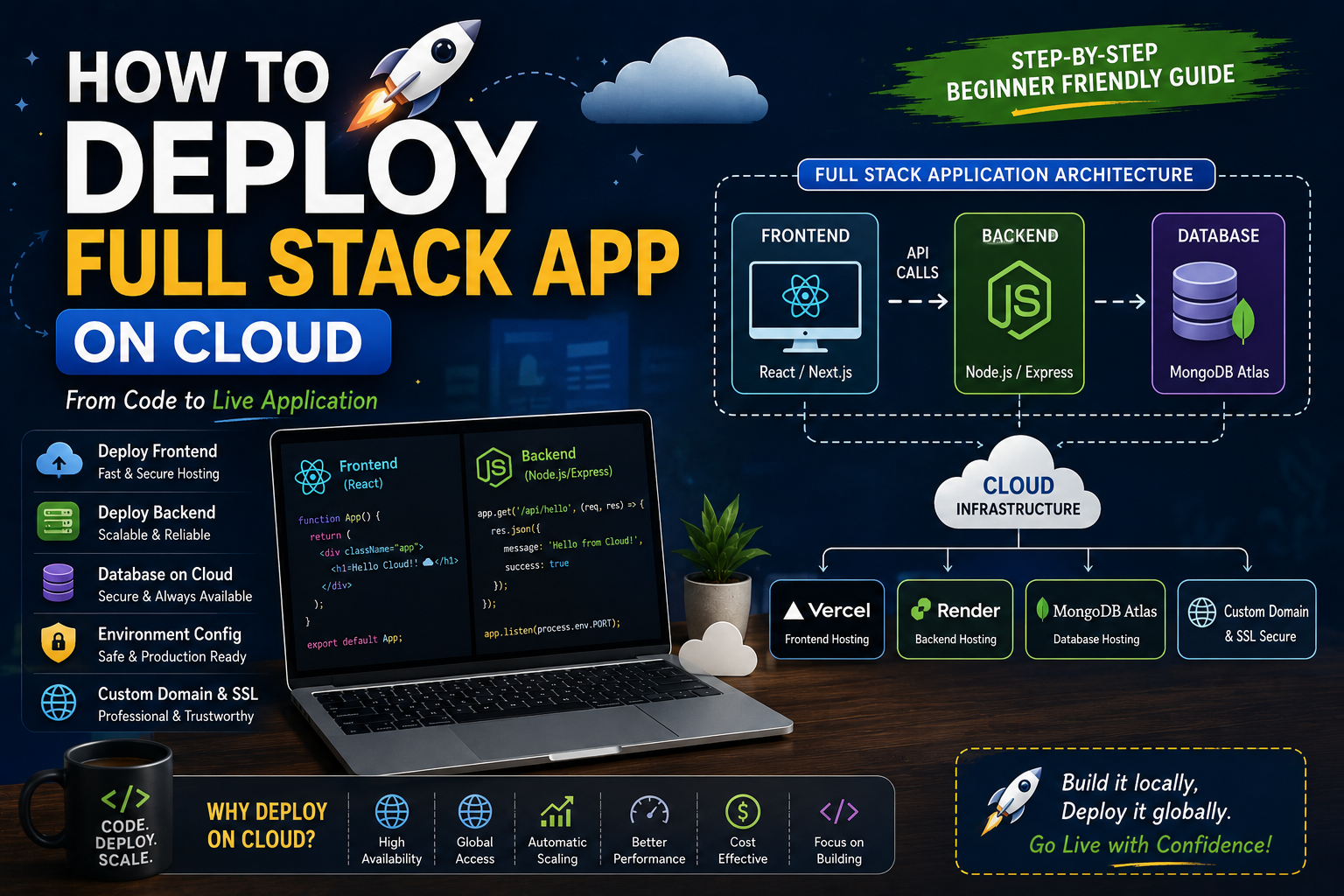
Practical Example: Deploying MERN Stack App
Let’s simplify realistic workflow.
Frontend:
React app on Vercel.
Backend:
Express API on Render.
Database:
MongoDB Atlas.
Frontend calls backend APIs.
Backend connects database.
Users access everything through deployed URLs.
This architecture is extremely common now.
Common Beginner Deployment Mistakes
Forgetting Production API URL
This breaks frontend-backend communication immediately.
Frontend must call deployed backend URL, not localhost.
Very common mistake.
Ignoring Build Errors
Sometimes local dev works but production build fails.
Especially with:
- imports
- environment variables
- TypeScript issues
Always test production builds locally first.
Poor Folder Structure
Messy projects become painful during deployment.
Clear separation helps:
- frontend
- backend
- shared configs
Organization matters more as projects grow.
What I Learned About Real Deployment
A few lessons became extremely clear over time.
Simplicity Wins
Complicated deployment pipelines overwhelm beginners quickly.
Start simple:
- frontend hosting
- backend hosting
- managed database
Enough initially.
Debugging Is Part of Deployment
Your first deployments will probably fail somewhere.
That’s normal.
Every deployment teaches:
- infrastructure
- networking
- environments
- production thinking
Failure is part of the learning curve.
Logs Are Gold
Seriously.
Logs reveal:
- crashes
- missing variables
- build failures
- API issues
Reading logs became one of the most valuable debugging skills for me.
Practical Beginner Deployment Stack
If I started again today, honestly I’d recommend something simple like:
Frontend:
- Vercel
Backend:
- Render or Railway
Database:
- MongoDB Atlas or Supabase
This stack reduces complexity massively for beginners.
CI/CD: The “Magic” Beginners See Online
This term intimidated me initially.
Simple explanation:
CI/CD automates deployment whenever code changes.
Push code to GitHub →
platform automatically deploys.
Feels magical initially honestly.
Modern platforms simplified this massively.
The Emotional Side of Deployment
Deployment emotionally frustrates developers differently than coding.
Because errors feel less predictable.
Sometimes:
- app works locally
- deployment fails mysteriously
You feel helpless initially.
I’ve had nights where deployment bugs consumed hours because of:
- wrong environment variable
- tiny typo
- incorrect build config
Tiny mistakes.
Huge consequences.
But over time you start recognizing patterns faster.
Confidence grows gradually.
Security Lessons I Learned
Deployment makes security feel real.
Important things include:
- hiding secrets
- HTTPS
- authentication protection
- secure database access
Beginners often accidentally expose secrets publicly.
Very dangerous.
Never commit:
- API keys
- secrets
- passwords
Into repositories.
Performance Optimization After Deployment
Another important realization:
deployment is not the end.
After deployment you start noticing:
- slow APIs
- large bundle sizes
- database bottlenecks
- image optimization problems
Production reveals issues localhost hides.
This phase improves engineering thinking massively.
Future of Cloud Deployment
Deployment is becoming easier every year.
AI tools and cloud platforms are automating huge parts of infrastructure complexity.
But foundational understanding still matters.
Because even automated systems require:
- debugging
- architecture thinking
- configuration understanding
Developers who understand systems deeply will always have advantages.
Real Advice I Wish Someone Told Me Earlier
Don’t fear deployment.
Break it into smaller pieces.
Frontend.
Backend.
Database.
Environment variables.
One step at time.
Another important thing…
Your first deployment does NOT need enterprise-level architecture.
Beginners often overcomplicate infrastructure too early.
Simple working systems are enough initially.
And maybe the biggest lesson:
Deployment problems do not mean you’re bad developer.
They mean you’re entering real-world engineering territory.
That’s progress.
LOOK HERE:
Deploying a full stack app on cloud is one of the biggest confidence-building moments in development.
Because suddenly your project becomes real.
Accessible.
Public.
Usable.
That feeling honestly never gets old.
And once deployment concepts click properly, many things start making sense:
- infrastructure
- APIs
- environments
- scalability
- production systems
The process feels intimidating initially because it combines many moving parts together.
But slowly patterns repeat.
Confidence builds.
And eventually deployment becomes less of a terrifying mystery and more of a normal part of development workflow.
