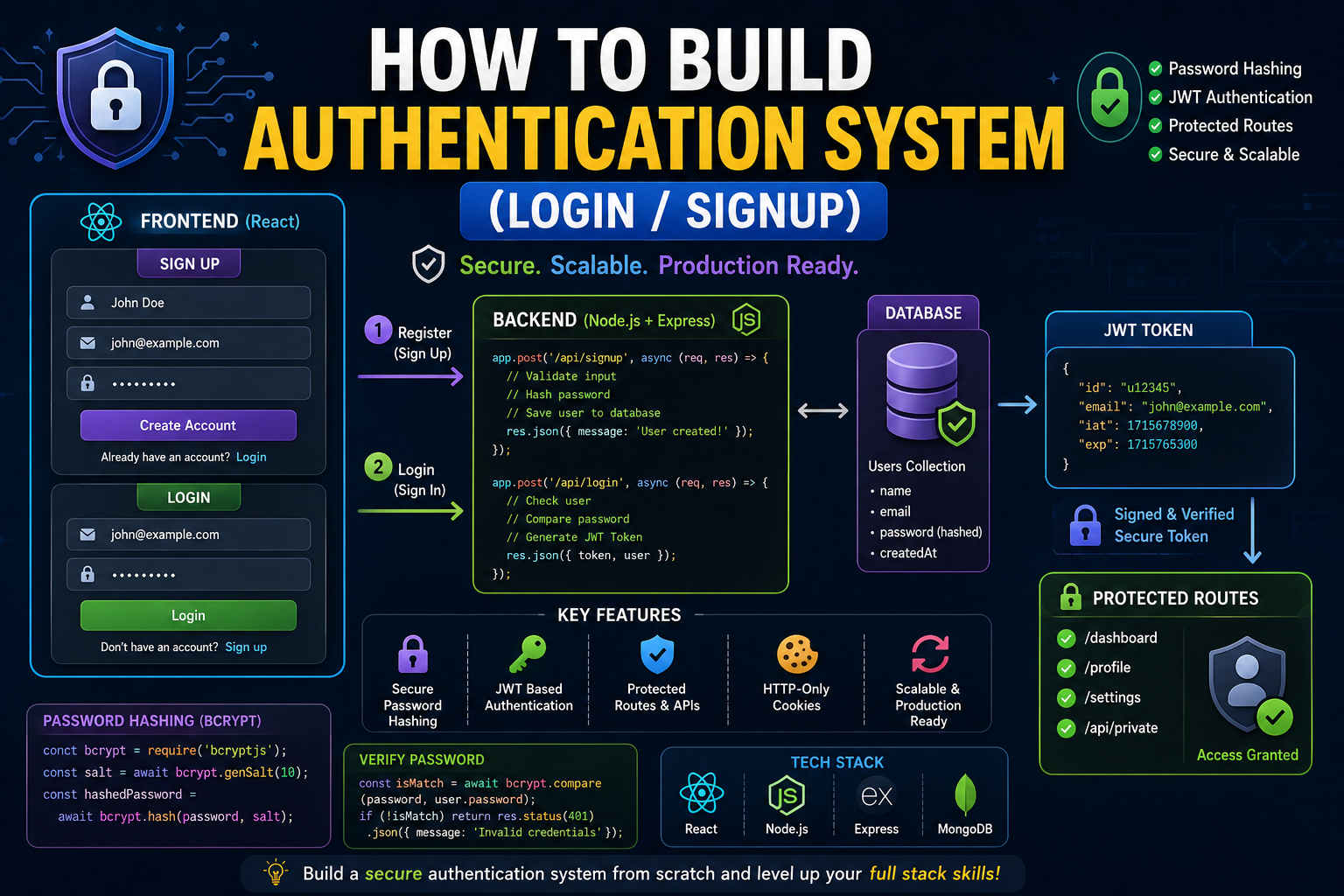
There’s a very specific moment in every developer’s journey where things suddenly stop feeling like “just tutorials” and start feeling like real software engineering.
That moment usually comes when you try building authentication for the first time.
Login.
Signup.
Protected routes.
JWT.
Cookies.
Sessions.
Password hashing.
Suddenly web development becomes serious.
I still remember my first attempt at building a proper authentication system because honestly… it was chaos.
The signup form worked sometimes.
Login broke randomly.
Passwords weren’t hashing properly.
Protected routes failed.
Tokens expired unexpectedly.
And don’t even get me started on debugging authentication bugs at 2 AM.
That phase frustrated me more than learning frontend itself.
Because authentication is where beginners suddenly realize:
“Okay… building real apps is much harder than cloning UI tutorials.”
But interestingly, authentication is also one of the most important things a developer can learn properly.
Because almost every real-world application needs it:
- SaaS products
- dashboards
- admin panels
- social apps
- e-commerce websites
- institute portals
- learning platforms
Everything needs user identity systems.
And once authentication finally clicks properly, your confidence as a full stack developer increases massively.
This article is basically everything I wish someone had explained earlier about building authentication systems in a practical human way — not robotic documentation explanations, not overly theoretical security lectures.
Just real developer struggles, practical understanding, mistakes, workflows, and lessons from actually building login/signup systems repeatedly.
Because honestly… authentication feels terrifying only until you understand the flow properly.
After that, it starts becoming one of the most satisfying parts of full stack development.
Why Authentication Confuses Beginners So Much
The biggest reason authentication feels overwhelming is because multiple concepts suddenly collide together at once.
You’re dealing with:
- frontend forms
- backend APIs
- databases
- password hashing
- tokens
- cookies
- sessions
- authorization
- protected routes
That’s a lot.
And most tutorials explain these things separately instead of showing the complete flow clearly.
I remember watching authentication tutorials initially and thinking:
“Why does this feel like cybersecurity instead of web development?”
Especially when terms like:
- JWT
- bcrypt
- refresh tokens
- HTTP-only cookies
- middleware
Start appearing everywhere.
But eventually I realized something important:
Authentication is basically just a system for verifying identity safely.
That’s it.
Once you simplify the mental model, things become much less scary.
What Authentication Actually Means
Let’s simplify this properly.
Authentication answers one question:
“Who is this user?”
Authorization answers:
“What is this user allowed to access?”
Huge difference.
For example:
User logs in successfully →
Authentication complete.
User accesses admin dashboard →
Authorization check happens.
Beginners often confuse these two concepts.
I did too initially.
The Simplest Real-World Analogy
Think about a hotel.
Authentication:
You show ID at reception.
Authorization:
Hotel decides which room you can enter.
Simple idea.
Very important distinction.
My Experience: The First Authentication System I Built
One of my earlier projects taught me authentication reality very brutally.
Initially I thought:
“Just compare email and password. Easy.”
Then reality appeared.
Problems started:
- storing passwords securely
- keeping users logged in
- protecting routes
- handling logout
- preventing unauthorized access
And suddenly authentication became much bigger than “simple login form.”
I remember spending hours debugging token issues because one small mistake broke the entire login flow.
At that time it felt incredibly frustrating.
Now honestly… those debugging sessions taught me more than many tutorials ever did.
The Biggest Beginner Mistake
Most beginners focus only on making login “work.”
They ignore:
- security
- token handling
- password safety
- protected routes
That’s dangerous.
Authentication is not only functionality.
It’s trust.
If your auth system is weak, your application becomes vulnerable quickly.
What Happens During Login and Signup
Understanding this flow deeply changes everything.
Signup Flow
User enters:
- name
- password
Frontend sends data to backend.
Backend:
- validates input
- hashes password
- stores user in database
Success response returned.
That’s signup.
Login Flow
User enters:
- password
Backend:
- finds user
- compares hashed password
- creates token/session
Frontend receives authentication response.
User becomes logged in.
Simple flow.
Many moving parts.
Why Password Hashing Matters
This concept scared me initially because it sounded very security-heavy.
Simple explanation:
Never store raw passwords directly.
Instead:
Passwords are transformed into encrypted-like hashes.
Example:mypassword123
Becomes something unreadable.
This protects users if database leaks happen.
bcrypt is commonly used for this.
And honestly… password hashing is one of the first moments developers realize:
“Okay, security actually matters.”
JWT Explained Simply
JWT confused me badly initially because tutorials overcomplicated it.
Simple explanation:
JWT (JSON Web Token) is basically proof that user already logged in successfully.
After login:
backend creates token.
Frontend stores token.
Frontend sends token with future requests.
Backend verifies token.
If valid →
user gets access.
That’s the core idea.
Cookies vs Local Storage
This topic causes endless beginner confusion.
I struggled here too.
Simple understanding:
Local Storage:
easy but less secure.
HTTP-only cookies:
more secure for authentication.
Many production apps prefer cookies because JavaScript cannot easily access them.
Security matters here.
Biggest Mistakes I Made
Storing Passwords Incorrectly Initially
Thankfully only during practice projects.
Still scary realization later.
Never store plain passwords.
Always hash them.
Hardcoding Secrets
I once accidentally exposed secret keys in GitHub repository.
Painful lesson.
Use environment variables properly.
Always.
Ignoring Token Expiration
Initially my tokens stayed valid forever.
Bad security practice.
Authentication systems need expiration handling.
Not Understanding Middleware
Middleware confused me badly initially.
Now it feels simple.
Middleware basically checks:
“Is user authenticated before accessing route?”
Very important concept.
Step-by-Step: Building Authentication System
This is the practical beginner-friendly flow I honestly wish someone had explained earlier.
Step 1: Create User Model
Database stores:
- name
- hashed password
Example:
{
  "name": "Ashish",
  "email": "ashish@example.com",
  "password": "hashed_password"
}
Step 2: Build Signup API
Backend receives:
- password
Checks:
- user already exists?
- valid inputs?
Then:
- hash password
- save user
Step 3: Build Login API
Backend:
- finds user
- compares password using bcrypt
- generates token
Returns authentication response.
Step 4: Store Authentication State
Frontend stores:
- token
OR - session cookie
Now user stays logged in.
Step 5: Protect Routes
Backend middleware checks authentication before allowing access.
Without token →
access denied.
Step 6: Logout Functionality
Frontend clears:
- token
OR - cookie
User session ends.
Simple but important.
What Protected Routes Actually Mean
This concept confused me initially too.
Protected routes mean:
certain pages or APIs require authentication.
Examples:
- dashboard
- profile
- admin panel
Without login:
access blocked.
Both frontend and backend can protect routes differently.
Why Authentication Bugs Feel So Frustrating
Authentication bugs are emotionally exhausting because many small things interact together.
Possible failures:
- token missing
- wrong headers
- cookie issues
- backend validation
- middleware problems
- expired tokens
Sometimes frontend works but backend fails.
Sometimes backend works but frontend state breaks.
This complexity overwhelms beginners initially.
I’ve spent entire evenings debugging authentication flows because of one tiny typo.
Very normal developer experience honestly.
Common Beginner Mistakes
Overcomplicating Authentication Early
Beginners often jump directly into:
- OAuth
- refresh tokens
- advanced session systems
Before understanding basic auth flow.
Master fundamentals first.
Ignoring Validation
Frontend validation matters.
Backend validation matters more.
Never trust frontend alone.
Backend must validate:
- email format
- password strength
- missing fields
Always.
Forgetting Error Handling
Authentication systems fail frequently in real world.
Examples:
- invalid credentials
- expired tokens
- duplicate accounts
Good UX requires handling errors gracefully.
Real Practical Example
Imagine building student dashboard platform.
Authentication flow:
- student signs up
- backend creates account
- password hashed
- token generated
- dashboard protected
Now only authenticated students access their data.
This is how most modern apps work conceptually.
What I Learned About Authentication
A few lessons became extremely clear over time.
Simplicity Wins Initially
Basic secure authentication is enough for most beginner projects.
Don’t overengineer immediately.
Security Is Not Optional
Authentication systems handle trust.
Weak security damages users.
Even beginners should take security seriously.
Understanding Flow Matters More Than Memorization
Once you deeply understand:
request → validation → token → protected access
Authentication becomes much easier.
Conceptual clarity matters massively.
Frontend Authentication Workflow
Frontend responsibilities:
- forms
- storing auth state
- sending requests
- redirecting users
- handling logout
Frontend mostly manages user experience around authentication.
Backend Authentication Workflow
Backend responsibilities:
- validating credentials
- hashing passwords
- generating tokens
- verifying sessions
- protecting APIs
Backend handles security logic.
The Emotional Side of Building Authentication
This part deserves honesty.
Authentication systems emotionally frustrate beginners because errors feel invisible.
Sometimes everything looks correct.
Still broken.
You start doubting yourself:
“Why isn’t this working?”
I’ve had moments where authentication bugs destroyed productivity for hours.
Especially token-related bugs.
But eventually patterns become familiar.
You recognize:
- header problems
- middleware issues
- token validation bugs
Confidence builds slowly through repetition.
Future of Authentication Systems
Authentication is evolving constantly.
Now apps increasingly use:
- OAuth
- magic links
- biometrics
- passwordless login
AI tools are simplifying auth implementation too.
But foundational understanding still matters massively.
Because even modern auth systems rely on same core concepts:
- identity verification
- secure access
- protected resources
Foundations stay relevant.
Real Advice I Wish Someone Told Me Earlier
Stop trying to memorize authentication tutorials blindly.
Understand the flow deeply instead.
That changes everything.
Another important thing…
Your first authentication system does NOT need enterprise-level complexity.
Simple secure login/signup is enough initially.
And maybe the biggest lesson:
Every developer struggles with authentication initially.
Seriously.
Even experienced developers still debug auth systems constantly.
Authentication bugs are practically a developer tradition at this point.
NOTE:
Building authentication systems is one of the most important turning points in full stack development.
Because suddenly applications become:
- personalized
- protected
- dynamic
- user-specific
And honestly… once authentication concepts click properly, many advanced systems become easier to understand:
- dashboards
- SaaS platforms
- admin panels
- subscriptions
- user management
Everything builds on identity systems.
The process feels overwhelming initially because security and logic combine together.
But slowly patterns repeat.
Confidence grows.
And eventually authentication stops feeling like mysterious hacker-level engineering and starts feeling like a normal development workflow.
